
Show customer details from your own system
Your team answers customers in Freesbe, but who those customers are lives in your own system: your customer database, billing or back office. A customer lookup brings that into Freesbe. When someone opens a customer’s conversation or takes their call, Freesbe asks your lookup who the customer is, and shows the card it answers with.
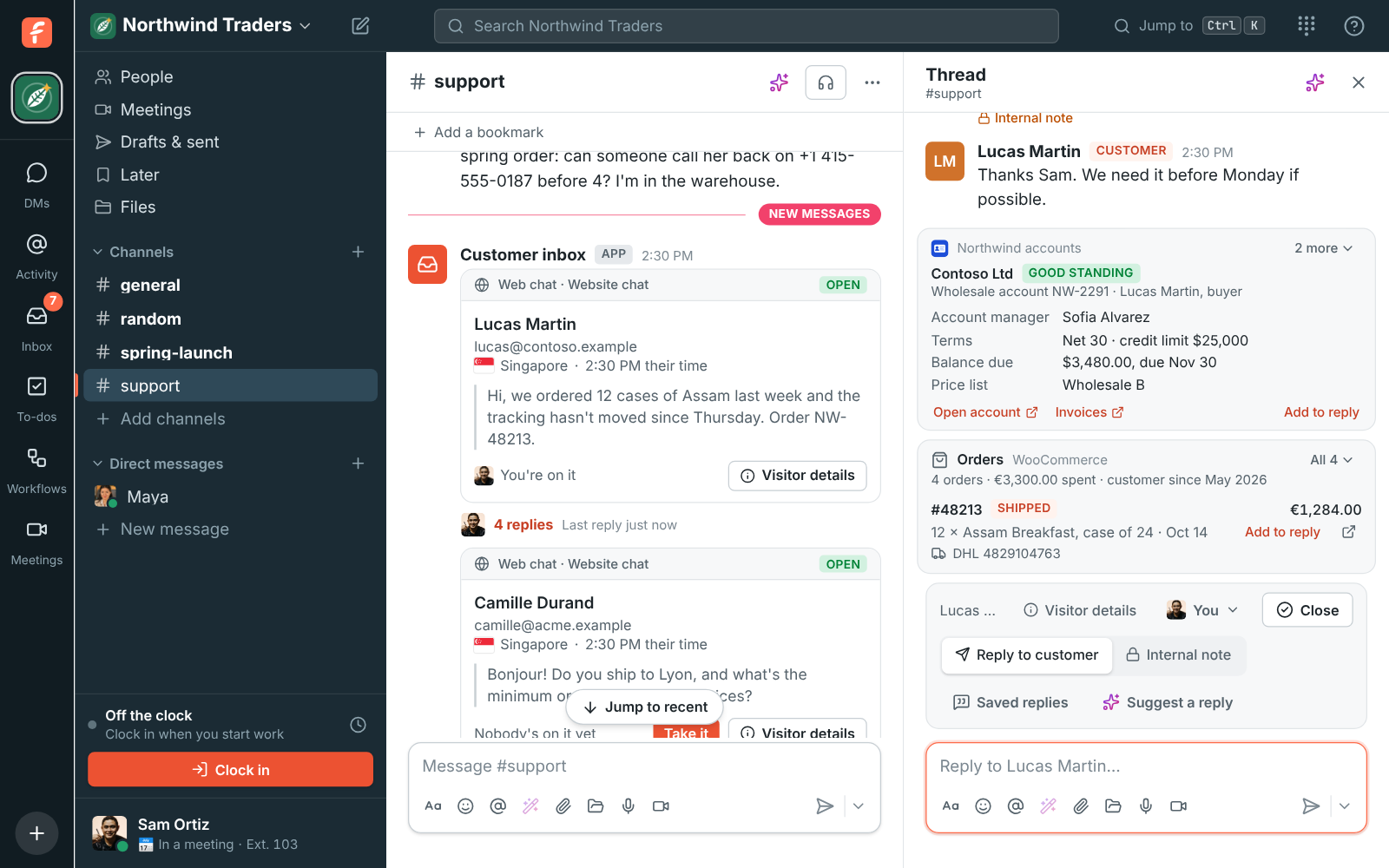
This walks through Northwind Traders’ lookup, Northwind accounts, which shows a wholesale customer’s account, terms and balance. You need a Freesbe owner or admin for step 1, and a developer who can put a small web endpoint in front of your system. It takes about an hour.
1. Make the app in Freesbe
Section titled “1. Make the app in Freesbe”- Open Workspace settings → Integrations & apps → Apps and click Create app.
- Name it after your system, like “Northwind accounts”. Its name and icon head every card.
- Tick only
customers:read. A lookup app needs nothing else. - Under Customer details, enter where your lookup will live, like
https://accounts.example/freesbe/customer. It has to be reachable from the internet over https. - Click Create app. You can close the bot token it shows: a lookup doesn’t use it.
- Open the app’s ⋯ menu, click Show signing secret, and copy it for step 2.
Give it an icon while you’re there (Edit, then Change icon), so your team can tell its card apart at a glance.
2. Write the lookup
Section titled “2. Write the lookup”Your lookup gets a POST with the customer’s email or phone number, and answers with a card. Keep the signing secret in your server’s secrets, never in the code.
This example is plain JavaScript with the standard Request and Response, so it runs on most
JavaScript servers and serverless platforms. findAccount is where your own database goes.
const SECRET = process.env.FREESBE_SIGNING_SECRET;
// Check that Freesbe sent it: an HMAC-SHA256 of "<timestamp>.<body>" with the signing secret.async function signedByFreesbe(request, body) {  const header = request.headers.get("Freesbe-Signature") ?? "";  const { t, v1 } = Object.fromEntries(header.split(",").map((part) => part.split("=")));  if (!t || !v1 || Math.abs(Date.now() / 1000 - Number(t)) > 300) return false;  const key = await crypto.subtle.importKey(    "raw",    new TextEncoder().encode(SECRET),    { name: "HMAC", hash: "SHA-256" },    false,    ["sign"],  );  const mac = await crypto.subtle.sign("HMAC", key, new TextEncoder().encode(`${t}.${body}`));  const expected = [...new Uint8Array(mac)].map((b) => b.toString(16).padStart(2, "0")).join("");  return expected.length === v1.length && timingSafeEqual(expected, v1);}
function timingSafeEqual(a, b) {  let diff = 0;  for (let i = 0; i < a.length; i++) diff |= a.charCodeAt(i) ^ b.charCodeAt(i);  return diff === 0;}
export async function handle(request) {  const body = await request.text();  if (!(await signedByFreesbe(request, body))) return new Response("Not signed", { status: 401 });
  const { customer } = JSON.parse(body);  const account = await findAccount(customer.email, customer.phone);  if (!account) return new Response(null, { status: 404 }); // No card for strangers.
  return Response.json({    card: {      title: account.company,      subtitle: `Wholesale account ${account.number} · ${account.contact}`,      badge: account.overdue        ? { text: "Past due", tone: "red" }        : { text: "Good standing", tone: "green" },      fields: [        { label: "Account manager", value: account.manager },        { label: "Terms", value: account.terms },        { label: "Balance due", value: account.balance },        { label: "Price list", value: account.priceList },      ],      links: [        { text: "Open account", url: `https://admin.northwind.example/accounts/${account.number}` },      ],      reply: `I can see your ${account.company} account (${account.number}).`,    },  });}
A few things that keep it quick and safe:
- Answer in under 3 seconds. Freesbe doesn’t wait longer, and the card just doesn’t show. Look customers up by an indexed email and phone column.
- Match phone numbers loosely. Freesbe sends numbers as they came in, usually with the country
code (
+31205550142). Compare the digits, with and without the country code. - Show what helps an answer. Status, plan, balance, who looks after them. Leave out what the team shouldn’t read aloud, like full card numbers or passwords.
- Log who looked. The request names the person looking (
user), if your system keeps an audit trail.
The customer details guide lists everything a card can hold.
3. Try it
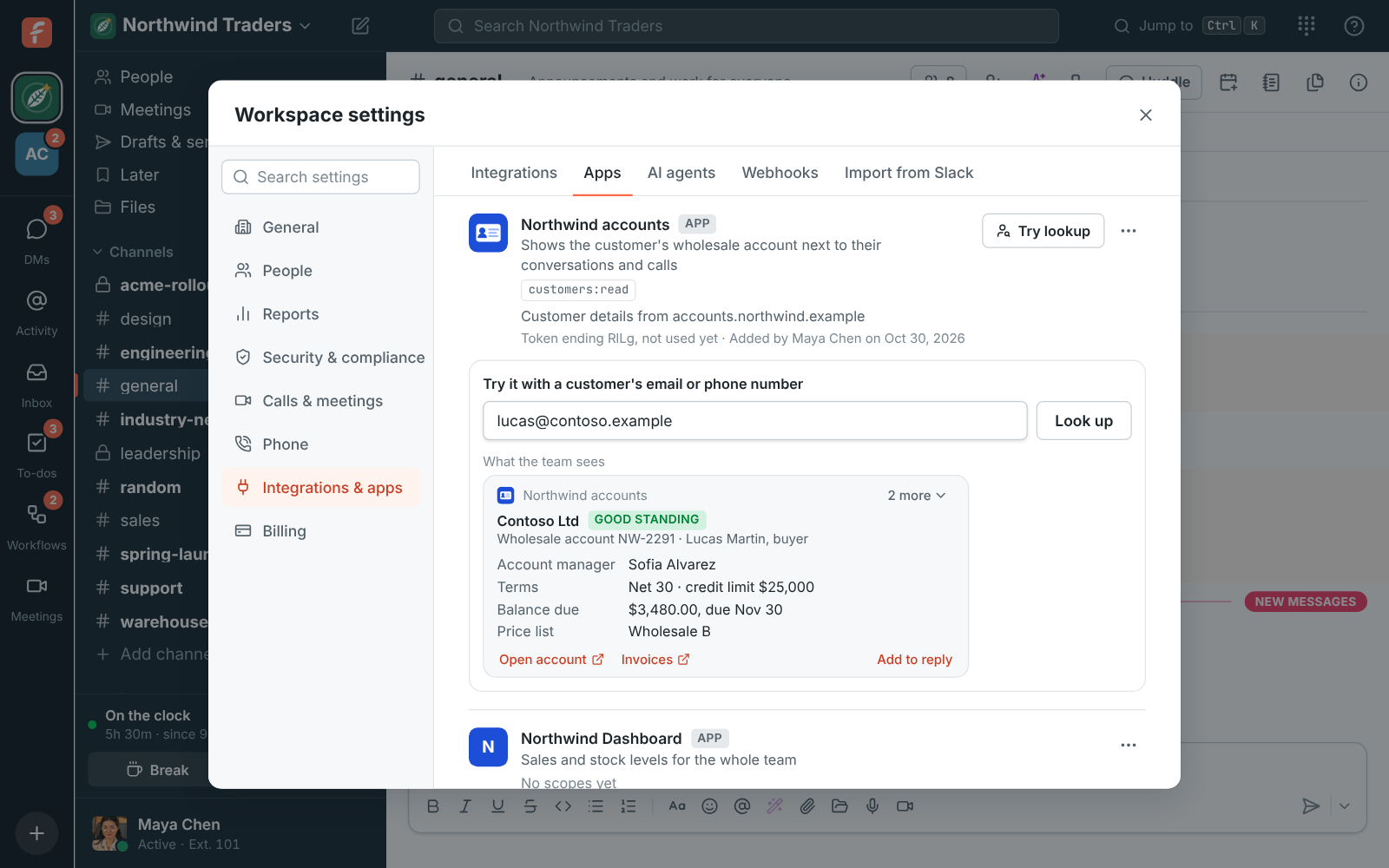
Section titled “3. Try it”- Back in Apps, click Try lookup next to your app.
- Type a customer’s email address or phone number and click Look up.
You see the card your team will see and how long your lookup took, or what went wrong:
| What it says | What to do |
|---|---|
| The app answered with HTTP 401 | The signature check failed: copy the signing secret again. |
| The app didn’t answer within 3 seconds | Make the lookup faster, for example with an index on email. |
| Couldn’t reach the app | Check the URL works from the internet, over https. |
| The app’s answer isn’t JSON | Answer with Content-Type: application/json and a JSON body. |
| The app’s card has no title | Every card needs a title. |
| The app doesn’t know them | Your lookup answered 404 or { "card": null } for that customer. |
Then open a real conversation in your inbox: the card shows over the box you reply in.
Good to know
Section titled “Good to know”- Making a new signing secret isn’t possible yet: if it leaks, delete the app and make a new one.
- Turning the app off stops the lookups at once; turn it on again from its ⋯ menu.
- Freesbe keeps no cards. Each look asks your system again, so what the team sees is always current.
Answers come from the Freesbe guides and are written by AI, so check the linked guide before relying on one. Please don't include personal details such as emails or passwords.