
Customer details from your own system
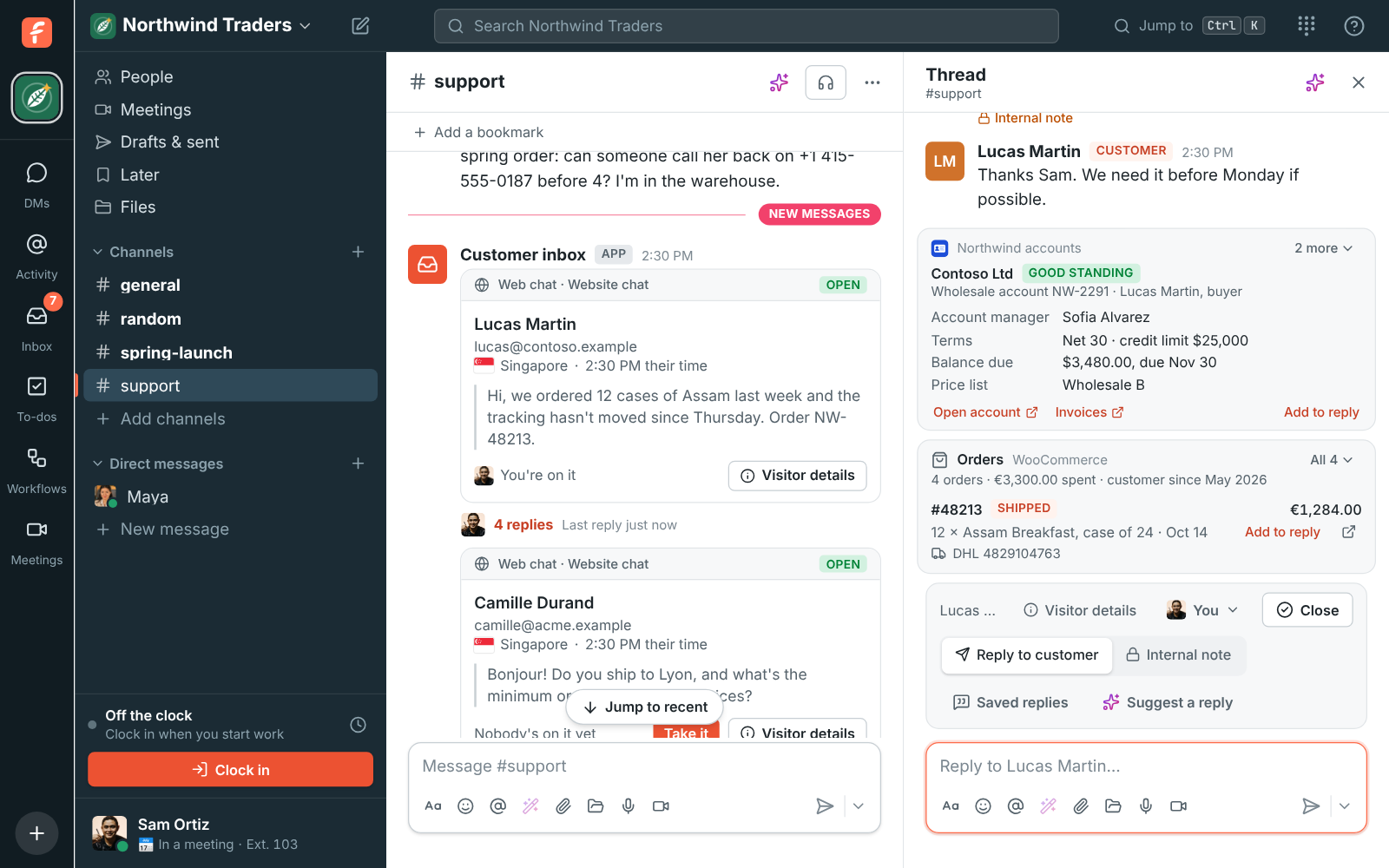
When a customer writes in or calls, your team usually opens another system to find out who they are: their account, their plan, whether they’re paid up. With a customer lookup, your own system answers that inside Freesbe. Freesbe asks your app who the customer is, and shows the card it answers with over the box in their conversation and on the call when they phone.
It works with any system you can put a small web address in front of: your customer database, your billing system, your back office. The app is your workspace’s own, so nobody outside your workspace sees it or can install it.
Using WooCommerce? Customer orders shows orders without writing any code.
What your team sees
Section titled “What your team sees”Over the inbox bar, each app that knows the customer shows a card with its icon and name:
- The customer as your system knows them, like their company or account name, and a line under it.
- A badge, like Active, Past due or Under review, in green, amber, red, blue or grey.
- Up to 8 details, like their plan, balance or account manager. The first 4 show; More shows the rest.
- Up to 3 links, like Open account, that open your system in a new tab.
- Add to reply, when your app gives one: it puts a ready answer in the reply box, for you to change before you send it.
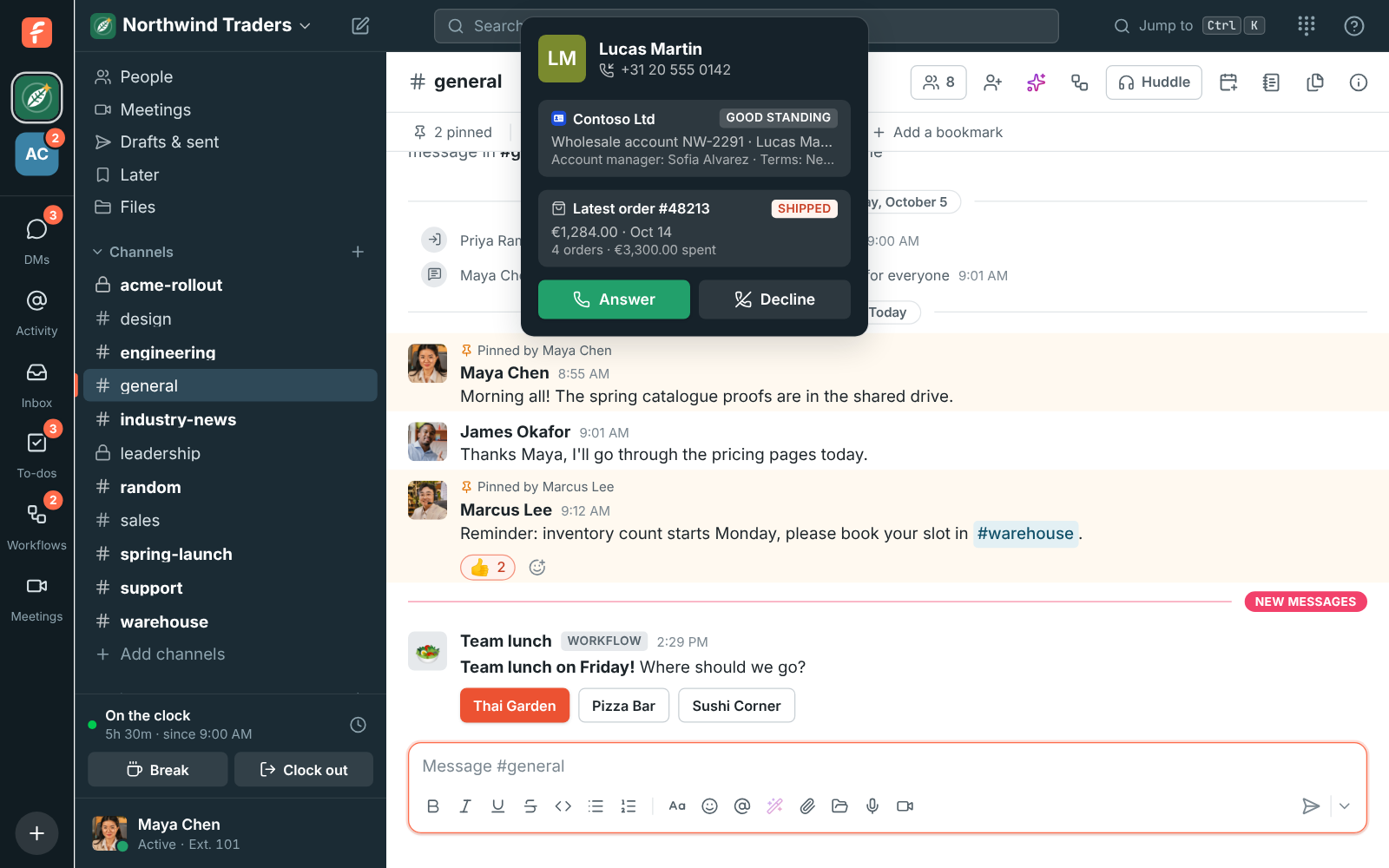
When a customer calls one of your Freesbe numbers, the ringing card shows their name, badge and first details, so you know who it is before you answer. It stays under their name during the call.
Set it up
Section titled “Set it up”You need an owner or admin to make the app, and a developer to put the lookup in front of your system. Step by step, with code: Show customer details from your own system.
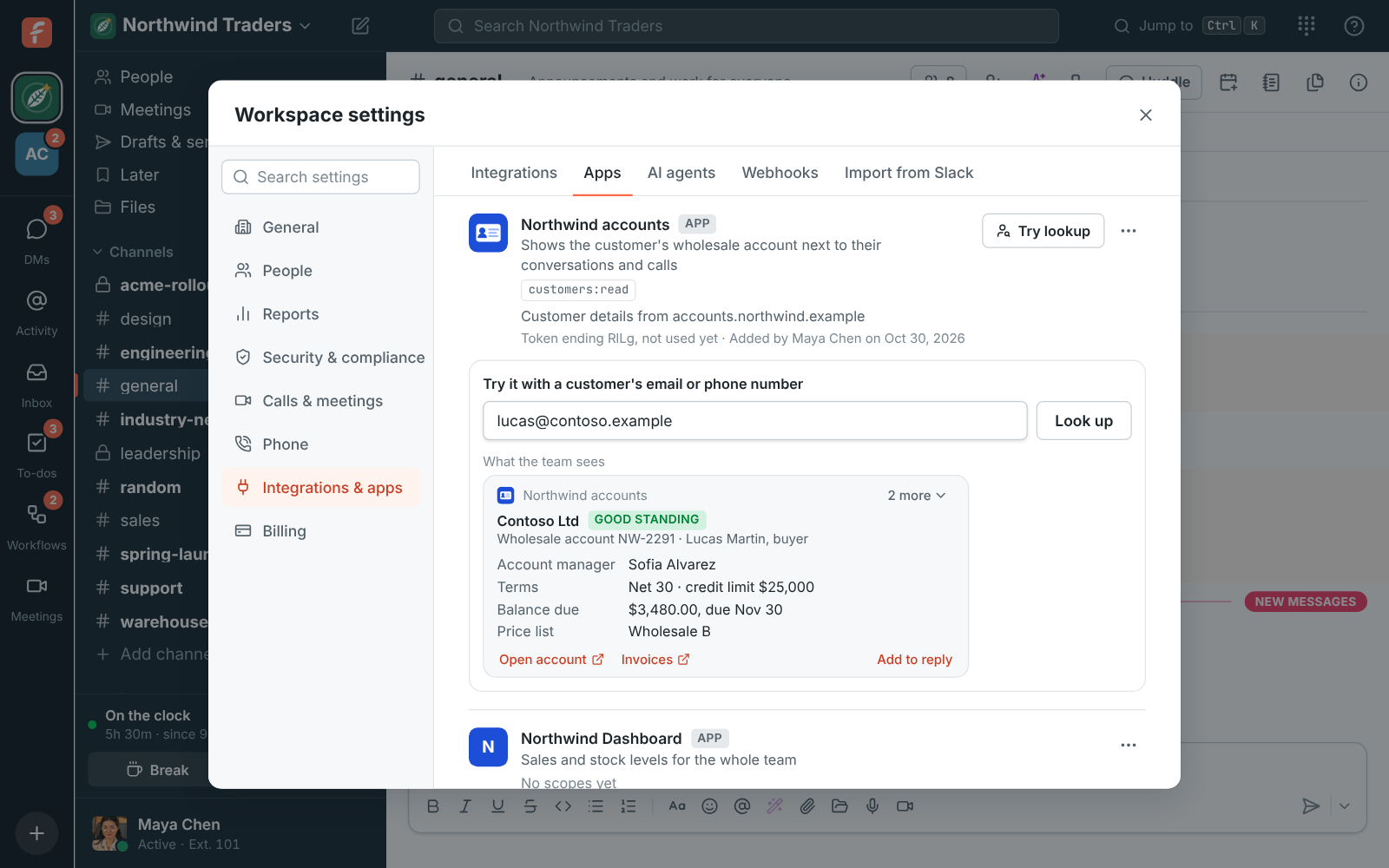
- Open Workspace settings → Integrations & apps → Apps and click Create app (or Edit an app you have).
- Tick the
customers:readscope. - Under Customer details, enter your Customer lookup URL, like
https://accounts.example/freesbe/customer, and save. - Click Try lookup next to the app, and type a customer’s email or phone number. You see the card your team will see, or what went wrong asking your app.
In a manifest, the URL goes under features:
display_information: name: Northwind accountsfeatures: customer_lookup: url: https://accounts.example/freesbe/customeroauth_config: scopes: bot: - customers:readWhat Freesbe sends
Section titled “What Freesbe sends”Each time someone opens a customer’s conversation, or a call from an outside number rings, Freesbe POSTs JSON to the lookup URL:
{ "type": "customer.lookup", "team_id": "01J9W6Q3ZB8M2N4P5R6S7T8V9W", "customer": { "email": "lucas@contoso.example", "phone": null, "name": "Lucas Martin" }, "source": "inbox", "inbox": "webchat", "user": { "id": "01J9W6Q3ZB8M2N4P5R6S7T8V9X", "name": "Sam Ortiz" }, "sent_at": 1762473600000}customeris who wrote or called: the email address or phone number they wrote from or called from, and the name they gave, when they gave one. Web chat visitors who left no email aren’t looked up.sourceisinboxfor a conversation,callfor a call, andtestfor Try lookup.inboxis the kind of inbox they wrote to:webchat,email,sms,whatsapp,telegram,messengerorinstagram.useris the person looking, so your system can log who looked a customer up.
The request is signed with the app’s signing secret, the same way as
app events: check the Freesbe-Signature header (or
X-Slack-Signature) before you answer. Anyone who has the URL but not the secret can’t ask your
system about your customers.
What your app answers
Section titled “What your app answers”Answer within 3 seconds with 200 and JSON:
{ "card": { "title": "Contoso Ltd", "subtitle": "Wholesale account NW-2291 · Lucas Martin, buyer", "badge": { "text": "Good standing", "tone": "green" }, "fields": [ { "label": "Account manager", "value": "Sofia Alvarez" }, { "label": "Balance due", "value": "$3,480.00, due Nov 30" }, { "label": "Website", "value": "contoso.example", "url": "https://contoso.example" } ], "links": [{ "text": "Open account", "url": "https://admin.example/accounts/NW-2291" }], "reply": "I can see your Contoso account (NW-2291)." }}| Field | What it is |
|---|---|
title |
Required. Who the customer is in your system, up to 80 characters. |
subtitle |
A line under it, up to 120 characters. |
badge |
text up to 30 characters, and tone: green, amber, red, brand or neutral. |
fields |
Up to 8, each a label and a value, and a url to make the value a link. |
links |
Up to 3, each a text and a url. |
reply |
What Add to reply puts in the box. |
Links must start with https://; others are left out. Longer text is cut.
When your system doesn’t know the customer, answer 404, or 200 with { "card": null }, and no
card shows.
Good to know
Section titled “Good to know”- Freesbe keeps nothing. It asks your app each time and shows the answer. Cards aren’t saved, searched or sent to the customer. The team’s browser keeps a card for a minute, so opening the same conversation again doesn’t ask twice.
- Who sees cards. Everyone who can see the conversation’s channel, and everyone who takes calls on the phone system. Guests don’t.
- When the app doesn’t answer in 3 seconds, answers with an error, or answers something Freesbe can’t read, its card stays hidden and the team sees the rest. Try lookup shows what went wrong.
- Turn the app off (its ⋯ menu) and Freesbe stops asking it at once.
- Several apps. Up to 3 apps can look customers up, each with its own card, in the order of their names.
- The inbox stays closed to apps. A lookup app hears who the customer is when someone looks, and nothing else: it can’t read or answer the conversation.
Answers come from the Freesbe guides and are written by AI, so check the linked guide before relying on one. Please don't include personal details such as emails or passwords.