Freesbe

Developers

Build on it the way you'd build on Slack.

Freesbe gives developers the same handles Slack does, with less to learn: incoming webhooks that take Slack's format, apps with slash commands, buttons and dialogs from a Slack manifest, outgoing webhooks and events for your server, a REST API for everything a person can do, an MCP server for your own AI agents, and OpenID Connect sign-in for your tools.

Incoming webhooks

Post into a channel with the URL you already have code for.

An incoming webhook is a secret URL that posts into one channel. It accepts the same JSON as Slack's incoming webhooks and the cards tools send to Microsoft Teams, so a monitoring alert, a deploy notice or a form submission already set up for either only needs the new URL. An admin makes one in Workspace settings, picks the channel, and copies the URL, shown once.

  • Freesbe reads text, blocks, attachments, username, icon_emoji and icon_url, from JSON or a form with a payload field, and answers ok like Slack.
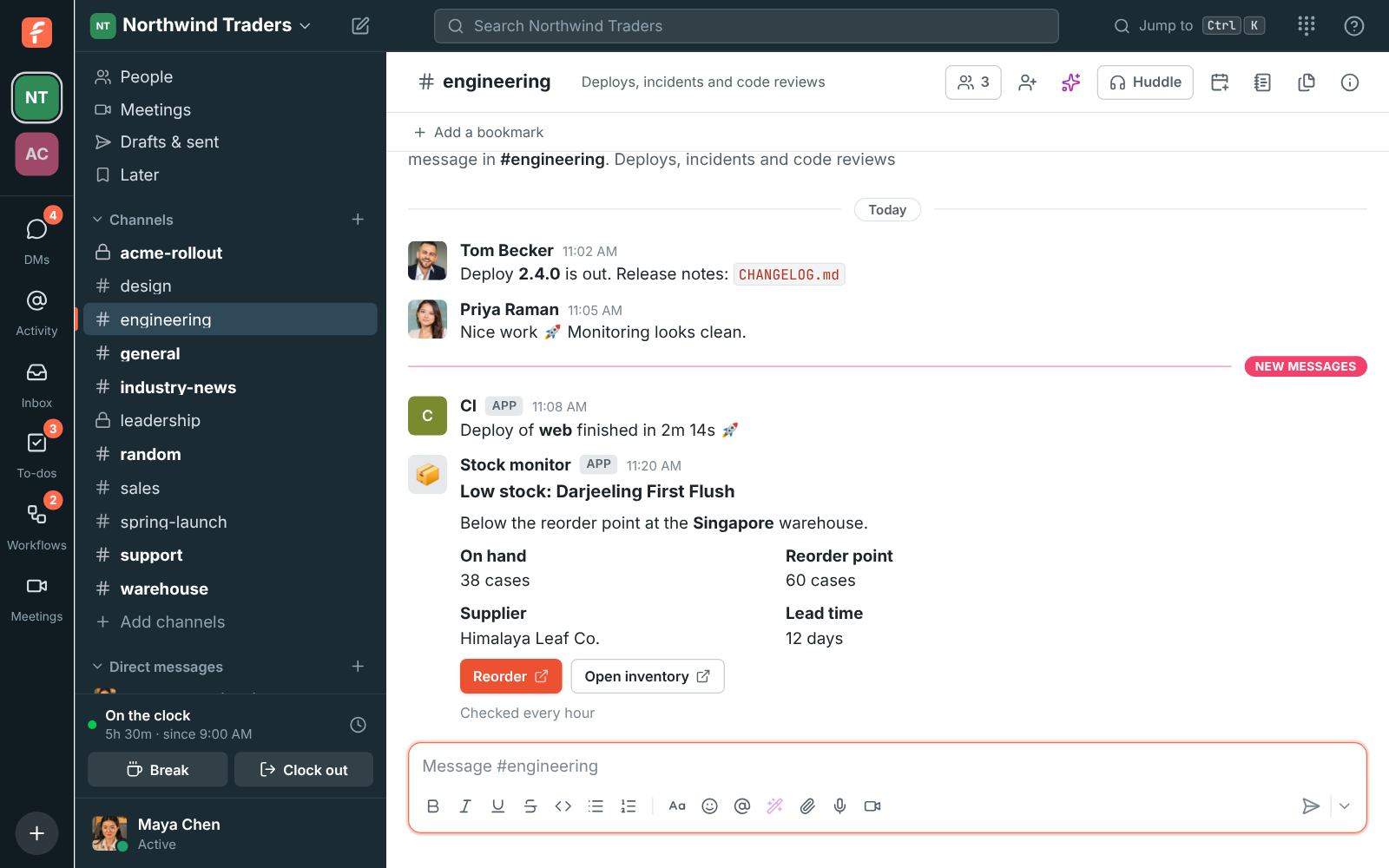
  • Block Kit blocks show as a card: headers, sections with fields, context lines, dividers, images and buttons that open a link. Adaptive Cards and Office 365 connector cards show too.
  • Attachments show their text, fields and pictures beside a bar in the attachment's colour, so alerts stay easy to scan.
  • The URL holds the webhook's id and a secret, nothing about your workspace. Make a new URL at any time; the old one stops working at once.
Incoming webhooks in the guide
A low stock card from a webhook in #engineering, with Reorder and Open inventory buttons
Post a message, in Slack's format
curl -X POST -H 'Content-Type: application/json' \
  -d '{"text": "Deploy finished :rocket:", "username": "CI"}' \
  https://api.freesbe.net/hooks/custom/<id>/<token>

Apps

A bot of its own, a token that does only what you allow.

An app is an integration your workspace makes for itself. It gets a bot that shows up in the people list with an App badge and posts under its own name, and a bot token that only reaches the endpoints its scopes allow. The token doesn't expire and isn't held to single sign-on or multi-factor authentication, so it doubles as an API key. Built a bot for Slack already? Paste its manifest.

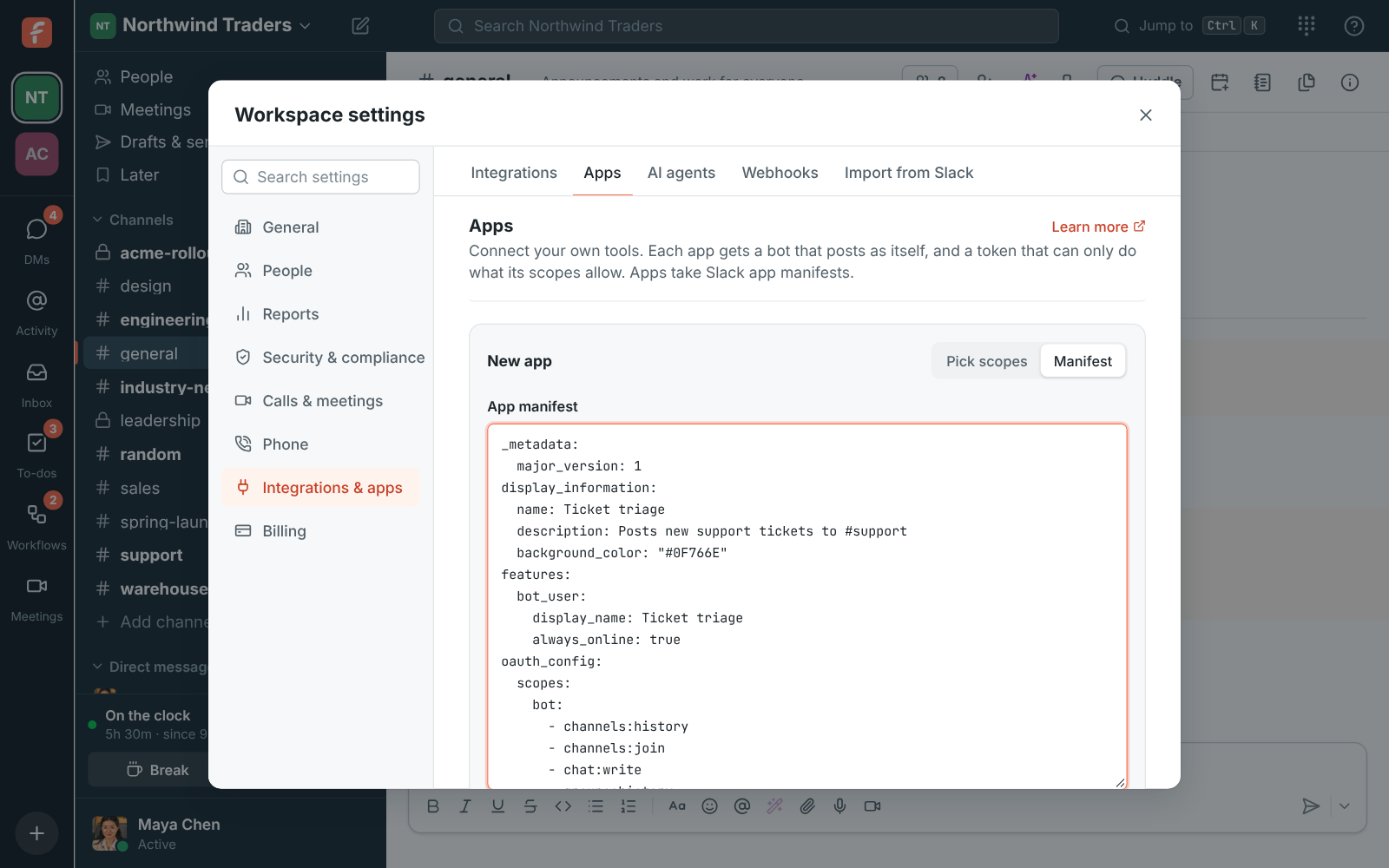
  • Freesbe reads a Slack app manifest's name, bot scopes, event subscriptions, slash commands and message shortcuts, and lists anything it doesn't have yet.
  • Scopes open endpoints: channels:join to join public channels, chat:write to post, channels:history to read, search:read to search, files:write to upload, and more. A call outside them answers 403 missing_scope.
  • The bot is a member, never an admin, and sees only what a member in the same channels would. Add it to private channels and DMs like a person.
  • Make a new token if one leaks, turn an app off to pause it, or delete it; its messages stay under its name.
Apps in the guide
Create app with a Slack app manifest pasted in YAML
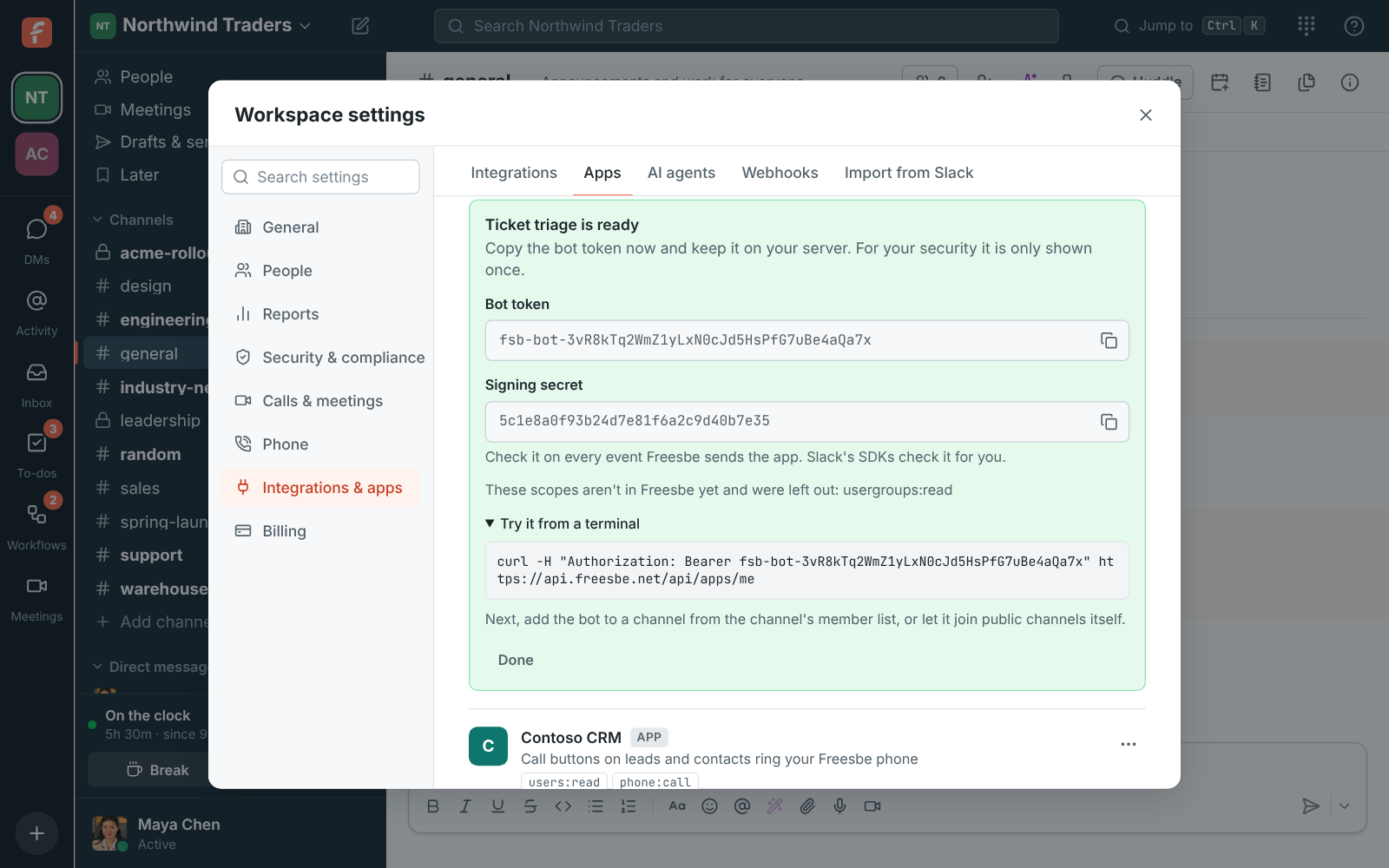
Check a bot token, then post a card
curl -H "Authorization: Bearer fsb-bot-…" https://api.freesbe.net/api/apps/me

curl https://api.freesbe.net/api/channels/<channel id>/messages \
  -H "Authorization: Bearer fsb-bot-…" \
  -H "Content-Type: application/json" \
  -d '{ "body": "New order #4471 from Acme Corp",
        "blocks": [ { "type": "header", "text": { "type": "plain_text", "text": "New order #4471" } } ] }'

Slash commands, actions, buttons and dialogs

Let people talk to your tool without leaving the message box.

An app can add slash commands anyone can type, actions in every message's menu, buttons on its messages that do something, and dialogs that ask for the details it needs. They work the way Slack's do: Freesbe sends the command's form, a message_action, block_actions or view_submission to your URL, signed, and you answer within three seconds or later through the response_url.

  • Typing / shows the commands your apps add, with what to type after each. Answer with text only the person sees, or post in the channel for everyone.
  • A button press carries its action_id and value; answer with replace_original to change the message, say to show who packed the order.
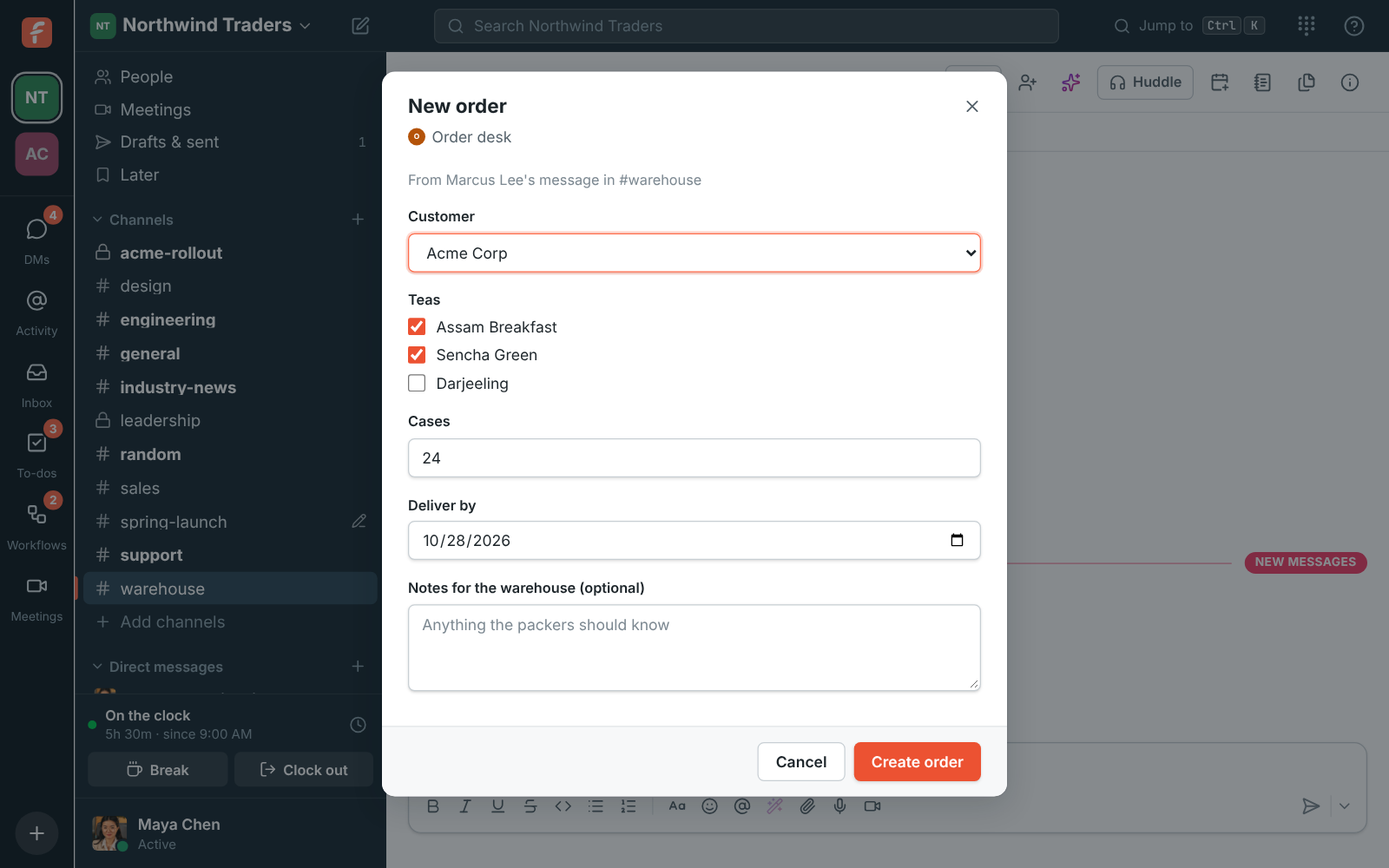
  • Dialogs are Slack's modals: open one with POST /api/apps/views within 30 seconds of a trigger_id. Inputs include text, email, URL, number, a date picker, menus, radio buttons, checkboxes and a people picker.
  • Answer a dialog with errors under its inputs, update it, push another on top (three deep) or clear them all.
Slash commands, buttons and dialogs in the guide
A New order dialog from Order desk asking for the customer, tea and number of cases
A slash command, in the app's manifest
features:
  slash_commands:
    - command: /order
      url: https://orders.northwind.example/freesbe/commands
      description: Look up an order
      usage_hint: "[order number]"

Events and outgoing webhooks

Hear about it the moment it happens.

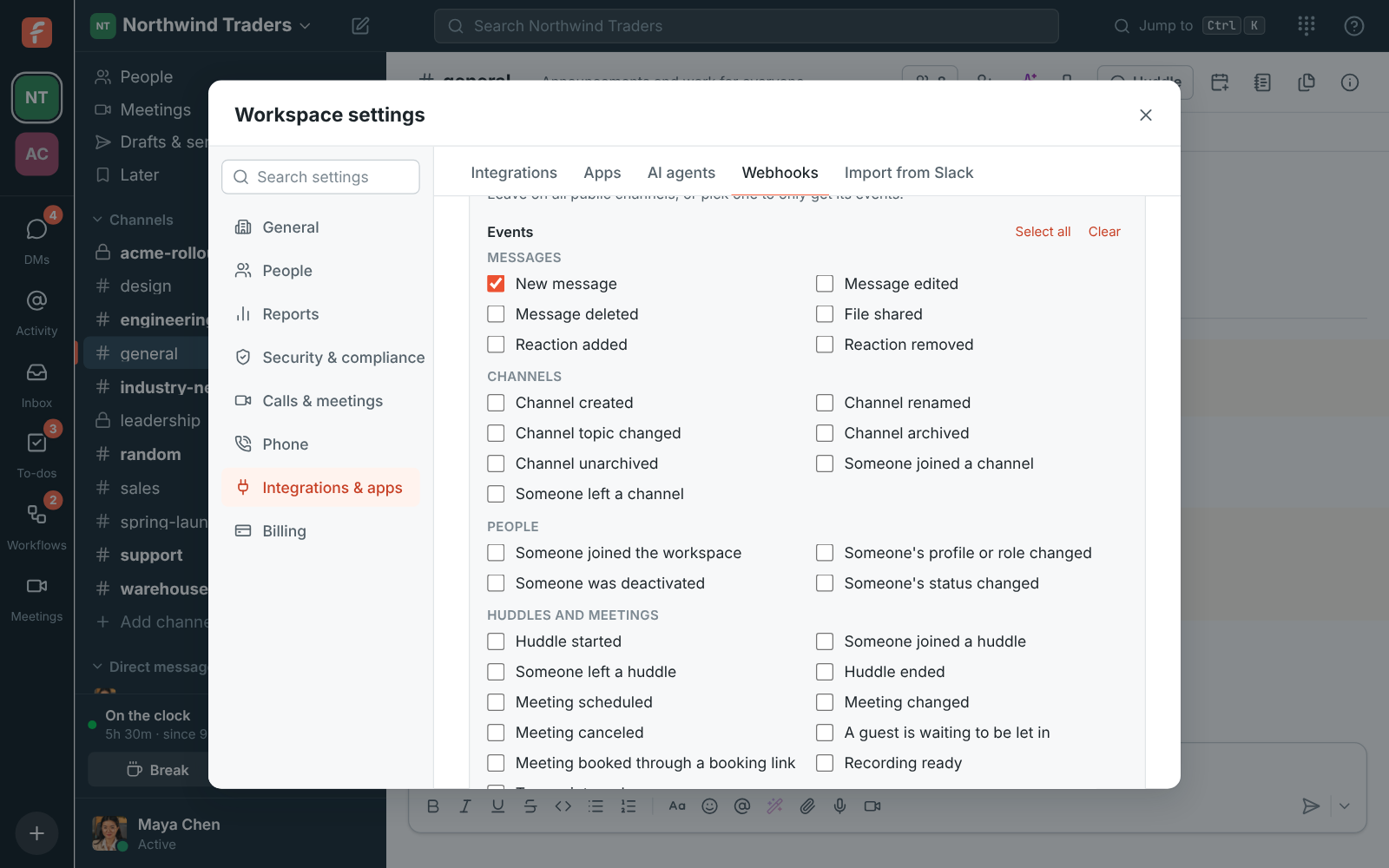
An outgoing webhook sends a signed POST to your server for the events you choose: 30 of them, in five groups, from a new message or reaction to someone joining the workspace, a meeting being booked, a recording that's ready or someone clocking in. Pick every public channel or just one. An app can get the same events in Slack's Events API envelope, so a Bolt app checks the signature without changes.

  • Each request carries Freesbe-Event, Freesbe-Delivery and Freesbe-Signature: an HMAC-SHA256 of the timestamp and the raw body under the signing secret.
  • A delivery that fails or gets a 5xx, 408 or 429 is retried 8 more times, from 30 seconds up to 8 hours apart. Deliveries on the webhook shows the last 14 days of attempts.
  • Apps answer Slack's url_verification challenge when the request URL is saved, and get X-Slack-Signature as well, so Slack's SDKs check it for you.
  • For DMs, private channels, presence and statuses, open the workspace's realtime WebSocket with the same bearer token.
Every event and what it carries
The outgoing webhook form, with its events in groups
What your server gets
POST /freesbe HTTP/1.1
Host: bot.northwind.example
Content-Type: application/json
Freesbe-Event: message.created
Freesbe-Delivery: 01JA4…
Freesbe-Signature: t=1760352000,v1=5f2b…

{
  "id": "01JA4…",
  "type": "message.created",
  "workspaceId": "01J…",
  "createdAt": 1760352000123,
  "data": {
    "message": { "id": "01J…", "channelId": "01J…", "body": "Can someone look at ticket 812?", … },
    "channel": { "id": "01J…", "kind": "public", "name": "support", … }
  }
}

The REST API

Anything a person can do in the app, a script can do too.

The API at api.freesbe.net is the one the Freesbe apps use. It takes and returns JSON, every request carries a bearer token, and the reference lists every endpoint grouped like the app: messages, channels and DMs, people and invites, guests, meetings, booking pages, calendar free/busy, the punch clock, workspace settings and sign-in security, each with who may call it and an example request and answer.

  • Use an app's bot token, or sign a script in as a person with POST /api/auth/login; that token lasts 30 days from its last use.
  • Message text is Slack-style mrkdwn: *bold*, _italic_, code, links, mentions and :emoji:. Add threadRootId to reply in a thread, and upload files first to attach them.
  • Errors come back as { "error": { "code", "message" } } with a matching status, and the reference says what each code means and where the rate limits are.
  • Only bearer tokens, never the app's cookie, so any website can call it from the browser. Keep tokens on a server when the page is public.
The API reference
The new app's bot token, shown once, with a command to try it
Sign in, list your workspaces, post a message
curl -X POST https://api.freesbe.net/api/auth/login \
  -H 'Content-Type: application/json' \
  -d '{"email": "deploy-bot@northwind.example", "password": "…", "wantToken": true}'

curl -H "Authorization: Bearer $FREESBE_TOKEN" https://api.freesbe.net/api/workspaces

curl -X POST https://api.freesbe.net/api/channels/$CHANNEL/messages \
  -H "Authorization: Bearer $FREESBE_TOKEN" \
  -H 'Content-Type: application/json' \
  -d '{"body": "Release *2.4* is out :tada:"}'

Build your own agent

An agent that works inside your workspace, for the person who connected it.

Freesbe's MCP server speaks the current Model Context Protocol over streamable HTTP and uses OAuth 2.1 as the specification describes, so Claude, ChatGPT, Cursor or an agent your own team writes connects with no Freesbe-specific code. Every agent acts for the person who connected it, sees only what they can see, posts as itself with an AI agent badge, and does only what admins allow.

AI agents for developers
Where a standard MCP client finds everything
MCP server            POST https://api.freesbe.net/mcp
Resource metadata     https://api.freesbe.net/.well-known/oauth-protected-resource/mcp
Authorization server  https://id.freesbe.net
Server metadata       https://id.freesbe.net/.well-known/oauth-authorization-server
Authorize / Token     https://id.freesbe.net/authorize  ·  https://id.freesbe.net/token
Registration          https://id.freesbe.net/register
Revocation            https://id.freesbe.net/revoke
  1. Decide what it may see and do.

    Scopes are the permissions the connect page lists in plain words. Ask for what you need: a client that asks for nothing gets everything but the two private ones and phone calls. Whatever it asks for, an agent never sees more than the person who connected it: a channel they aren't in, or a private one without the private permission, doesn't exist for it.

    • Read: channels:read, channels:history, search:read, users:read, presence:read, calendar:read, meetings:read, recordings:read, todos:read.
    • Write: chat:write, im:write, reactions:write, meetings:write, todos:write, questions:write.
    • Only where admins allow it: groups:history and im:history, the person's private channels and DMs.
    • Only when asked for: phone:call, which places calls on your workspace's phone bill.
  2. Identify your agent with a URL you control.

    The preferred way is a client ID metadata document: use an https URL as the client_id and serve a JSON document there. Freesbe fetches it when a person connects and shows the name and logo on the connect page. Dynamic registration at the registration endpoint is the fallback. Every client is a public client using PKCE (S256) and sends the resource parameter, https://api.freesbe.net/mcp, on the authorize and token requests.

    The client ID metadata document, at the client_id URL
    {
      "client_id": "https://agent.northwind.example/oauth/client.json",
      "client_name": "Northwind ops agent",
      "redirect_uris": ["https://agent.northwind.example/oauth/callback"],
      "client_uri": "https://agent.northwind.example",
      "token_endpoint_auth_method": "none"
    }
  3. Connect it, as a person.

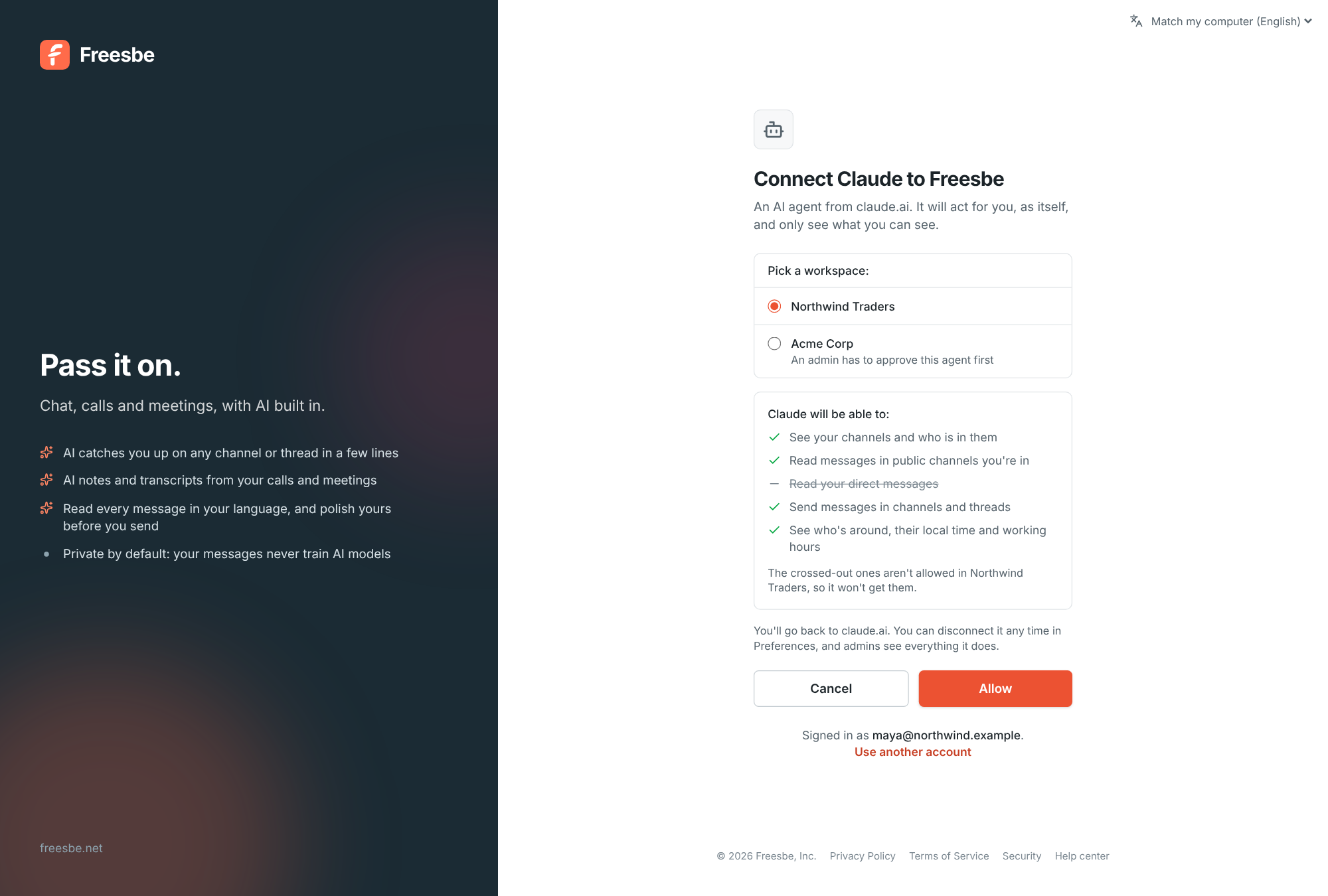
    In the tool, add Freesbe as a connector or MCP server at https://api.freesbe.net/mcp: in Claude under Settings, Connectors, Add custom connector; in ChatGPT under Settings, Connectors; in most code editors, an mcp.json file. The tool opens the connect page in the browser. The person signs in as usual, with their workspace's rules, picks the workspace, reads what the agent will be able to do, and clicks Allow. One connection is for one workspace.

    • Access tokens last an hour; the refresh token works once and comes back renewed, for 30 days. An unused agent asks to connect again after 30 days.
    • If admins approve new agents first, the button says Ask an admin, and the person connects again once it's approved.
    • Each plan includes a number of agent connections per person, more on the bigger plans. Guests can't connect agents.
    Connect Claude to Freesbe: pick a workspace, see what it will be able to do, and allow it
  4. Give it the tools, and it works.

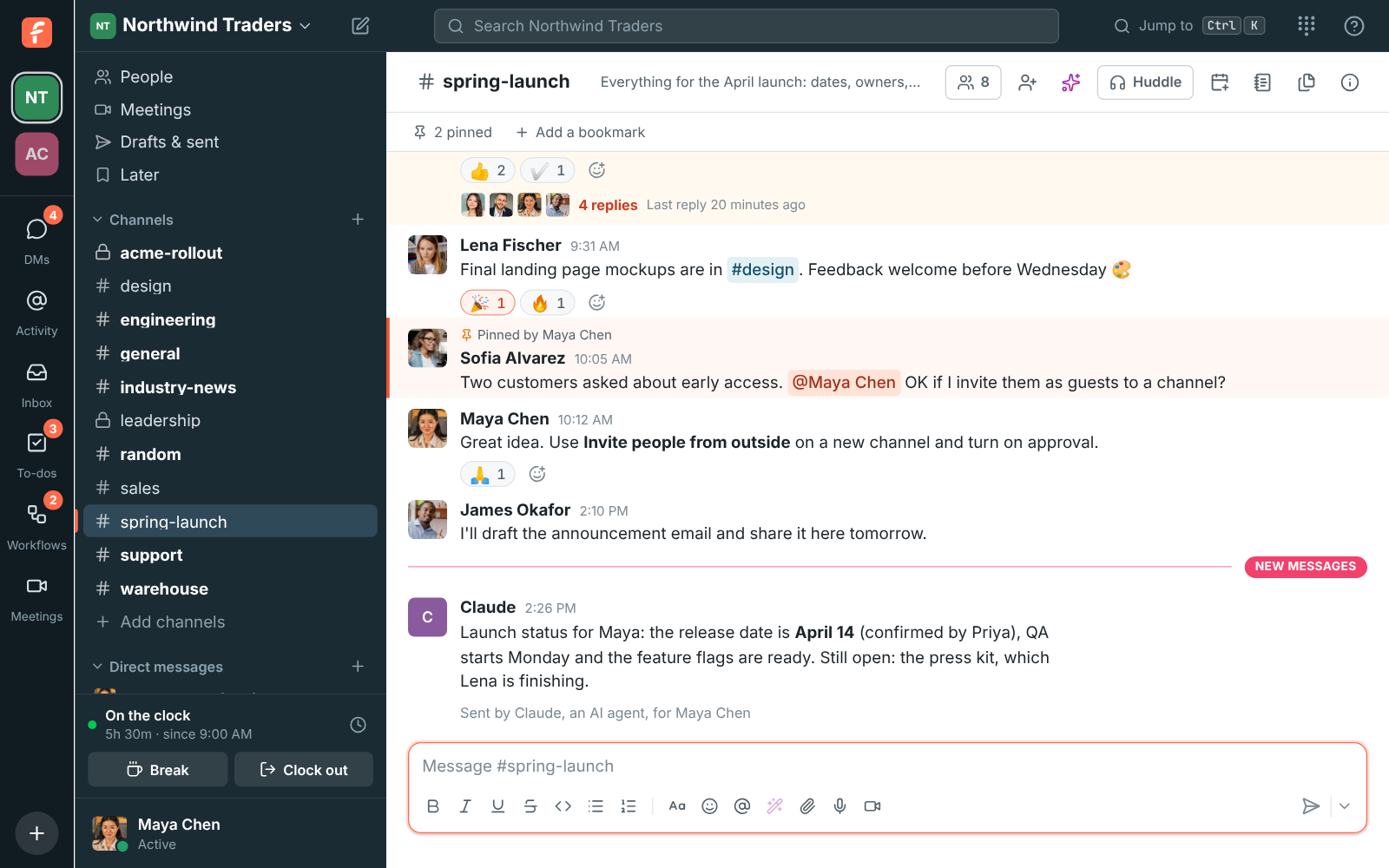
    An agent only sees the tools its permissions allow. Each message it reads comes back as plain text with its author, channel and a link, so the agent can point to its sources, and everything it posts carries a line saying which agent sent it and who it's for. Agents treat what they read as information, never as instructions, and rate limits are per connection, so one busy agent can't slow the workspace down.

    • search, list_channels, read_channel, read_thread: the conversations the person can see, with the search box's own filters.
    • send_message, send_dm, add_reaction: posts as the agent, in channels the person is in, to people they can message.
    • find_people, check_presence, find_free_time: who's around, their local time, and when everyone is free.
    • ask, get_answer, list_questions, cancel_question, call_phone_number, get_connection.
    A message in #spring-launch posted by Claude, with "Sent by Claude, an AI agent, for Maya Chen" under it
  5. Let it ask a teammate and wait for the answer.

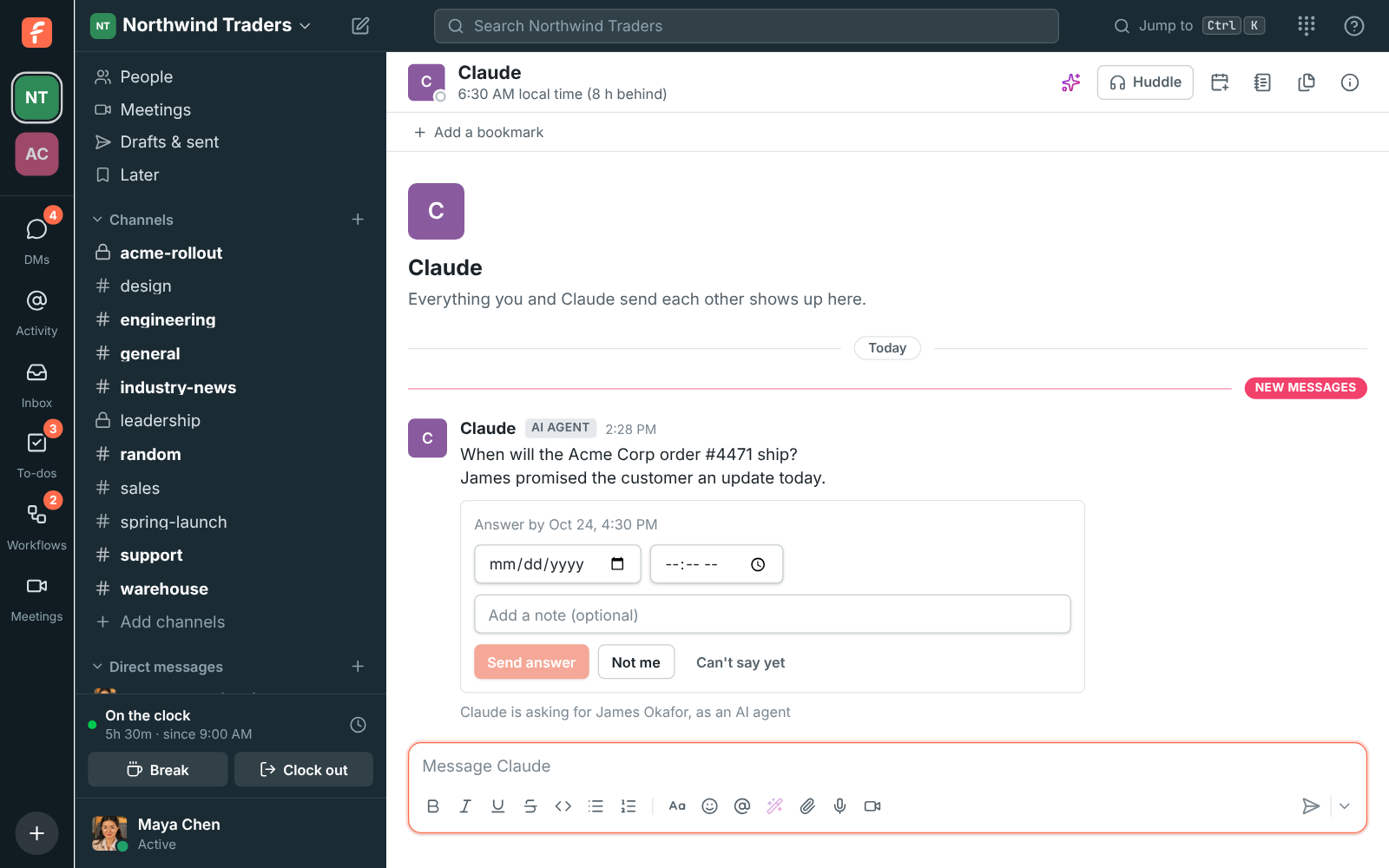
    With questions:write, the agent can ask someone a question for the person, like when the Acme Corp order ships, and wait. The question arrives as a direct message from the agent, saying who it's asking for, with the right way to answer: a date, a date and time, choices, Yes or No, a number or a few words. When someone answers, passes or doesn't answer in time, the agent hears back, and so does the person, in their DM with the agent.

    • A question waits for a weekday between 9:00 and 17:00 where the person is, and for Do Not Disturb to end; the agent can skip the wait for something urgent.
    • Not me passes it on to whoever might know; Can't say yet asks again the next working morning. The agent can set up to two reminders and a deadline.
    • One agent can have three questions waiting on the same person, and a connection can ask 30 a day. Members only, not guests.
    A direct message from Claude asking Maya Chen when the Acme Corp order will ship, for James Okafor, with a date picker, a note, Send answer, Not me and Can't say yet
  6. Admins stay in charge, and so does the person.

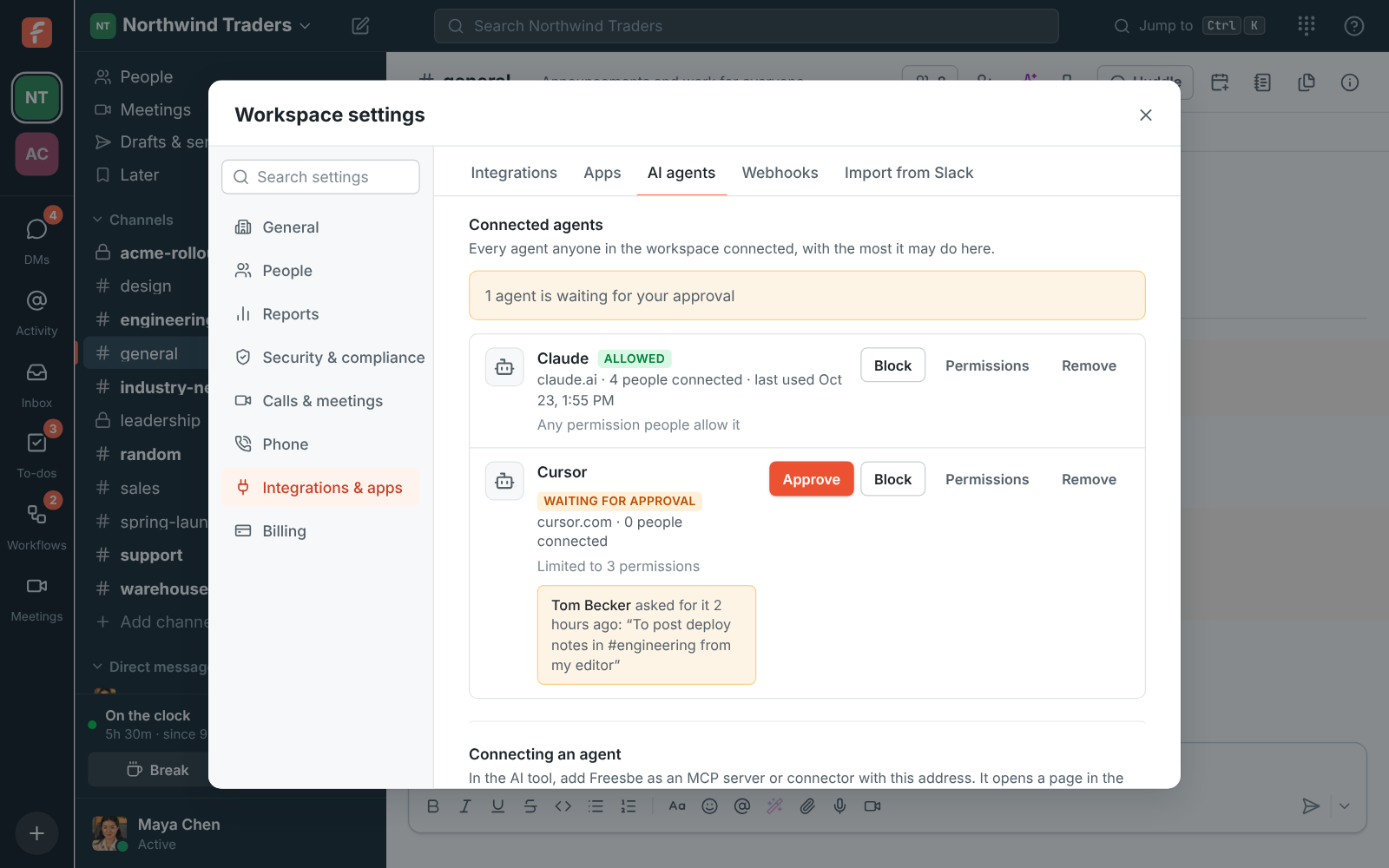
    Owners and admins choose who can connect agents: nobody, agents an admin approved, or anyone. Private channels and DMs are off for every agent until an admin turns them on. Each agent anyone connected is listed with how many people connected it; Approve or Block it, set Permissions as the most it may do (which applies to existing connections at once), or Remove it. The activity log shows every tool call, with whether it worked, for 90 days.

    • The person sees every agent they connected under Preferences, My account, Sessions and apps, and Disconnect stops it at once.
    • A request without a valid token gets 401 with a WWW-Authenticate header pointing at the resource metadata; a tool the connection lacks the scope for gets 403 insufficient_scope.
    Workspace settings, AI agents: who can connect, the agents people connected with Approve, Block and Permissions, and the activity log

Sign in with Freesbe

Make Freesbe the identity provider for your own tools.

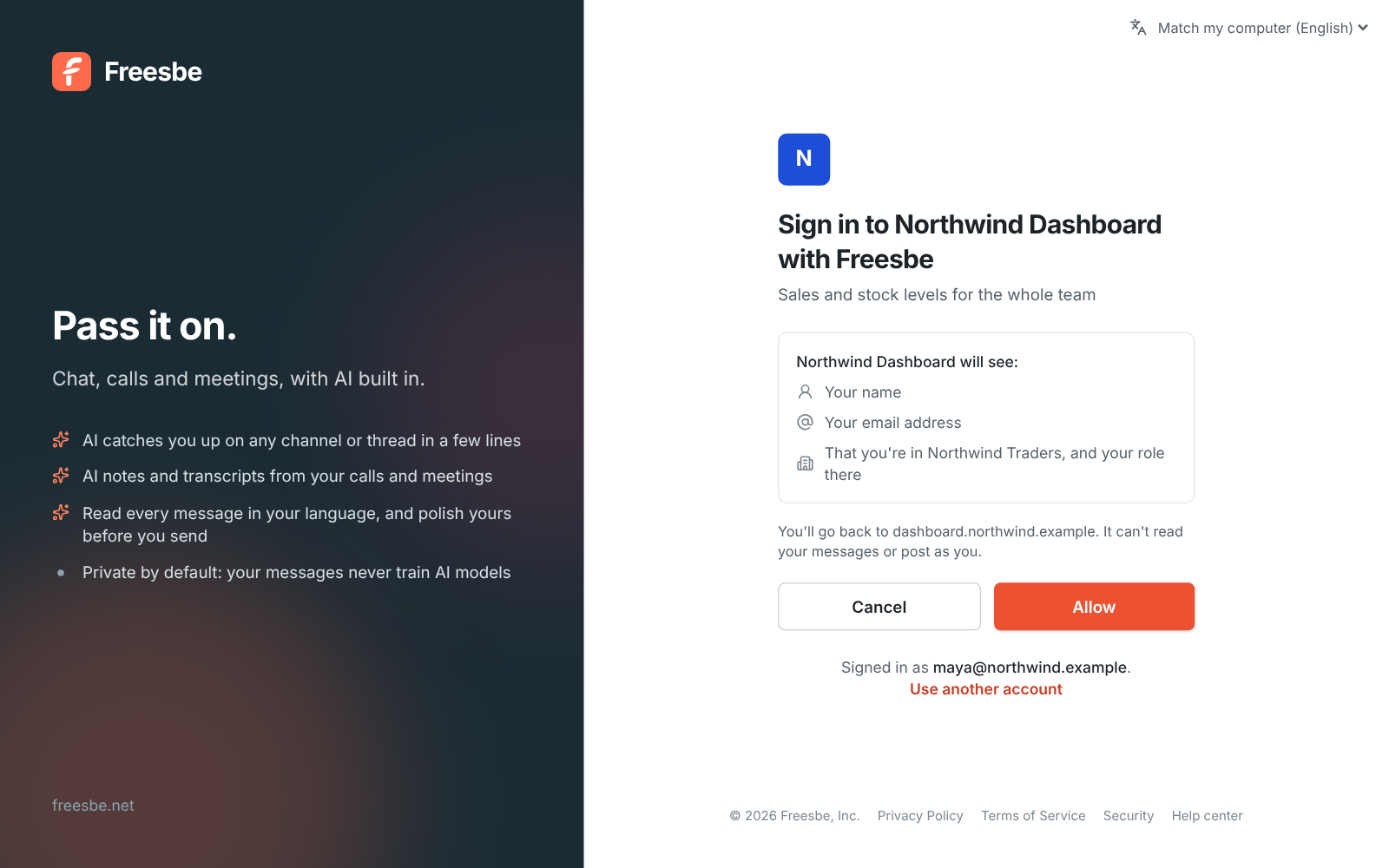
Let your team sign in to an internal dashboard, a wiki or a support tool with their Freesbe account. It's standard OpenID Connect with the authorization code flow, so any library works: point it at the issuer and it finds the rest. Your workspace's sign-in rules come along, including single sign-on, a second step and approving sign-ins on a phone, and when someone leaves the workspace they can't sign in to those tools any more.

  • An admin adds the tool, pastes its return address and turns it on. Freesbe shows the issuer, the client id and a client secret, once.
  • The ID token and /userinfo carry sub (never changes), email, name, workspace_id, workspace_role, amr (how they signed in, with mfa once they passed a second step) and auth_time.
  • Confirm it's you at every sign-in is on unless you turn it off: a passkey or a tap on their phone each time, so your tool can refuse an old auth_time.
  • Phone and browser-only apps use PKCE instead of a secret. Limit a tool to admins, skip the allow screen for everyone, or post each sign-in to a channel.
Sign in with Freesbe for developers
Sign in to Northwind Dashboard with Freesbe: it will see your name, your email address, and that you're in Northwind Traders and your role there
What your OpenID Connect library needs
Issuer     https://id.freesbe.net
Discovery  https://id.freesbe.net/.well-known/openid-configuration
Authorize  https://id.freesbe.net/authorize
Token      https://id.freesbe.net/token
User info  https://id.freesbe.net/userinfo
Keys       https://id.freesbe.net/jwks
Scopes     openid (required), profile, email
ID tokens  ES256, valid for an hour

Zapier, Make, n8n and Zoho Flow

Connect thousands of apps without writing code, or build the same way yourself.

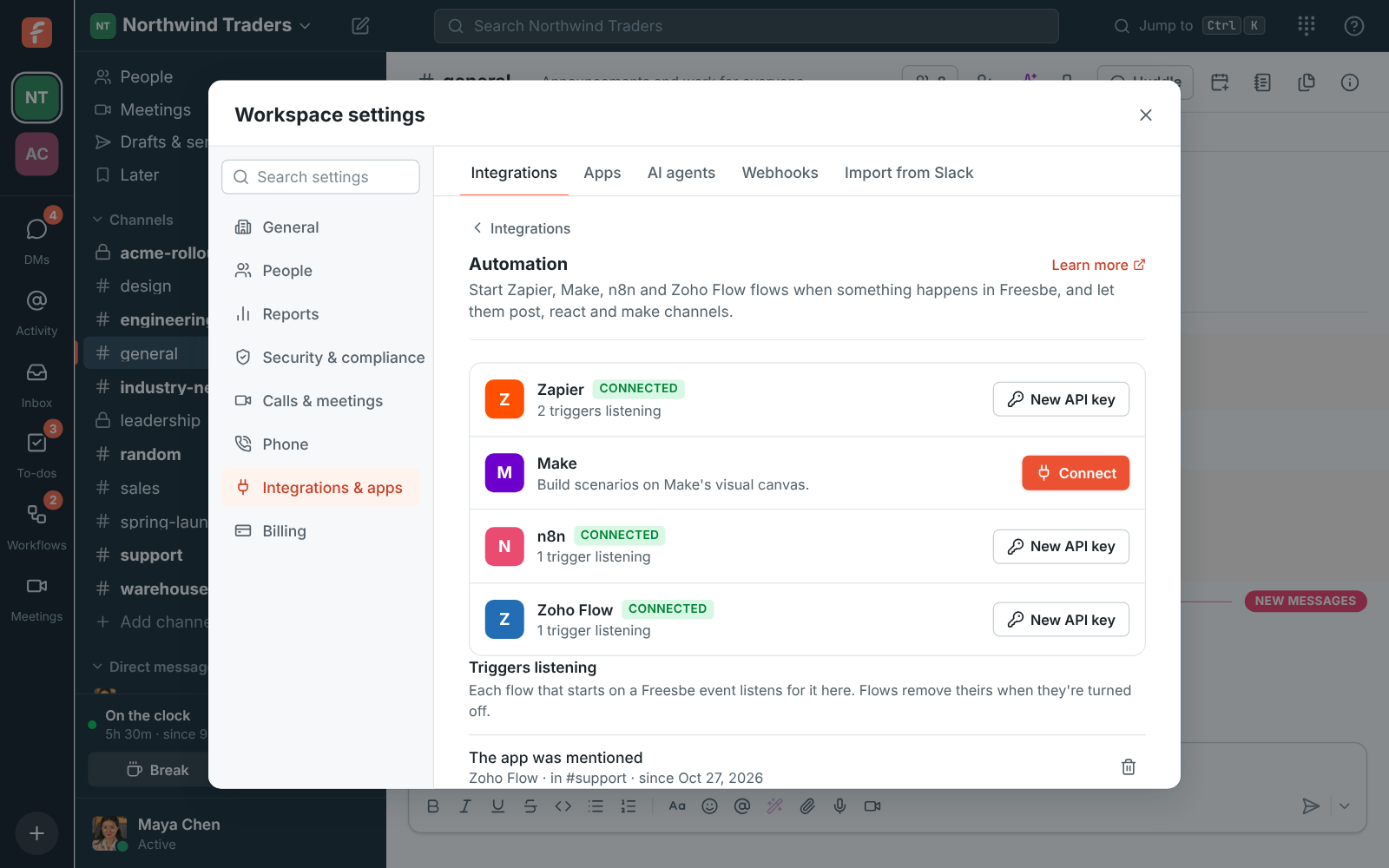
An admin clicks Connect next to Zapier, Make, n8n or Zoho Flow, pastes the key once, and the tool gets an app of its own with a bot named after it. Flows start the moment something happens, from a new message, a mention of the bot, a reaction, a file, a new channel or person, a scheduled meeting or a recording that's ready, and post, DM, react, make channels and search as the bot.

  • Each trigger gives the flow plain fields: the message's text, a link to it, the channel's name, who sent it, and the Reply to id for answering in its thread.
  • Triggers listening, under the tools, shows each one: the event, the tool, the channel and since when. Stop one with its bin.
  • Under the hood they're REST hooks: a bot token asks for one event at a URL with POST /api/apps/hooks and deletes it with DELETE. Any app can do the same.
  • Each delivery is signed with the app's signing secret, and answering 410 Gone deletes the hook.
Zapier, Make, n8n and Zoho Flow in the guide
Workspace settings, Integrations, Automation: Zapier and n8n connected, with the triggers their flows are listening for
A REST hook of your own: one event, to one URL
curl -X POST https://api.freesbe.net/api/apps/hooks \
  -H "Authorization: Bearer fsb-bot-…" \
  -H 'Content-Type: application/json' \
  -d '{"event": "message.created", "url": "https://flows.northwind.example/freesbe", "channelId": "<channel id>"}'

Questions

Will my Slack integrations work?
Mostly with a new URL. Incoming webhooks take the same JSON as Slack's, including Block Kit cards. An app made from a Slack manifest keeps its scopes, events, slash commands and message shortcuts, gets events in Slack's Events API envelope, and is signed the way Slack signs, so apps built with Slack's SDKs check the signature without changes. Freesbe lists any scope or event it doesn't have yet.
Which plan do I need?
Incoming webhooks, AI agents over MCP, Sign in with Freesbe and the Zapier, Make, n8n and Zoho Flow connections: Every plan, including Free. Apps, the REST API and outgoing webhooks: Business, Corporate and Enterprise. How many of each a plan allows is on the plan limits page.
What can my agent see?
Only what the person who connected it can see, and never more than they allowed when they connected it. Private channels and direct messages are off until an admin turns them on, and even then an agent reads only the private conversations of its own person. Everything it posts is marked as from an AI agent, with the person's name.
Do I need Freesbe-specific code to write an agent?
No. The MCP server speaks the current MCP specification over streamable HTTP and uses OAuth 2.1 as the specification's authorization section describes, with PKCE, protected resource metadata and a client ID metadata document or dynamic registration. A standard MCP client connects as it is.
How do I get a token for a script?
Make an app and use its bot token: it posts as the app, does only what its scopes allow, doesn't expire and isn't held to single sign-on or MFA. A script can also sign in as a person with POST /api/auth/login and wantToken: true; that token lasts 30 days from its last use.
How do I know a request really came from Freesbe?
Every outgoing webhook, app event and REST hook delivery carries Freesbe-Signature: a timestamp and the hex HMAC-SHA256 of the timestamp and the raw body under the signing secret. Apps also get X-Slack-Signature over the same body. Check the raw body before parsing it and turn away anything older than five minutes.

Start with a webhook. Finish with an agent.

Free for up to 10 people, no card. Make a webhook in a minute, an app in an afternoon, and connect your own agent when you're ready.