Freesbe

Finance

All plans

Stripe payments, posted the moment they land.

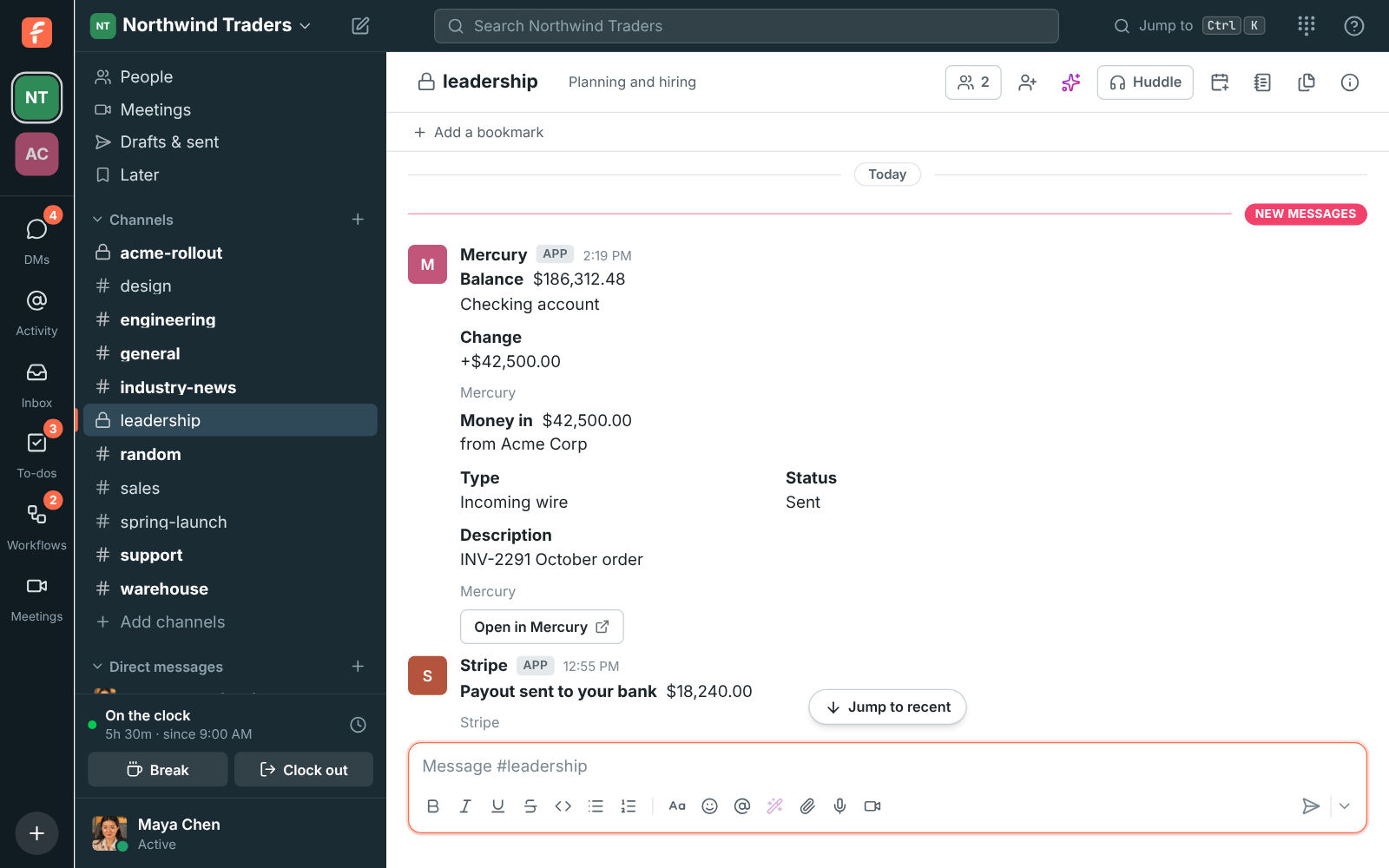
Connect Stripe and payments received, paid invoices, payouts, refunds, failed payments, disputes and new or canceled subscriptions post into the channel you pick, each as a card with the amount, who paid and its status, and an Open in Stripe button. Set a smallest amount so a busy account doesn't drown the channel in small payments.

  • Your finance team sees payments and payouts without logging in to Stripe.
  • Pick money in, money out, balance changes, or problems like failed payments and disputes.
  • A smallest amount keeps coffee-sized payments out of the channel; balances always post.
  • Amounts in each currency's own units, and test-mode events marked as such.
  • Every delivery is checked against Stripe's signature and posted once.

For Founders and finance teams who take payments through Stripe.

Alerts in #leadership, with a Stripe payout reaching the bank

A URL for Stripe, a secret for Freesbe

An owner or admin clicks Connect under Stripe in Workspace settings, Integrations, Finance, picks the channel and the alerts, and gets an endpoint URL. In the Stripe Dashboard, under Developers, Webhooks, add an endpoint with that URL and pick the events: payments succeeded, invoices paid, refunds, payouts paid or failed, disputes, failed invoice payments, subscriptions created or deleted, and balance available. Paste the endpoint's signing secret back into Freesbe. Until it's saved the account says Needs secret and Stripe's deliveries are turned away.
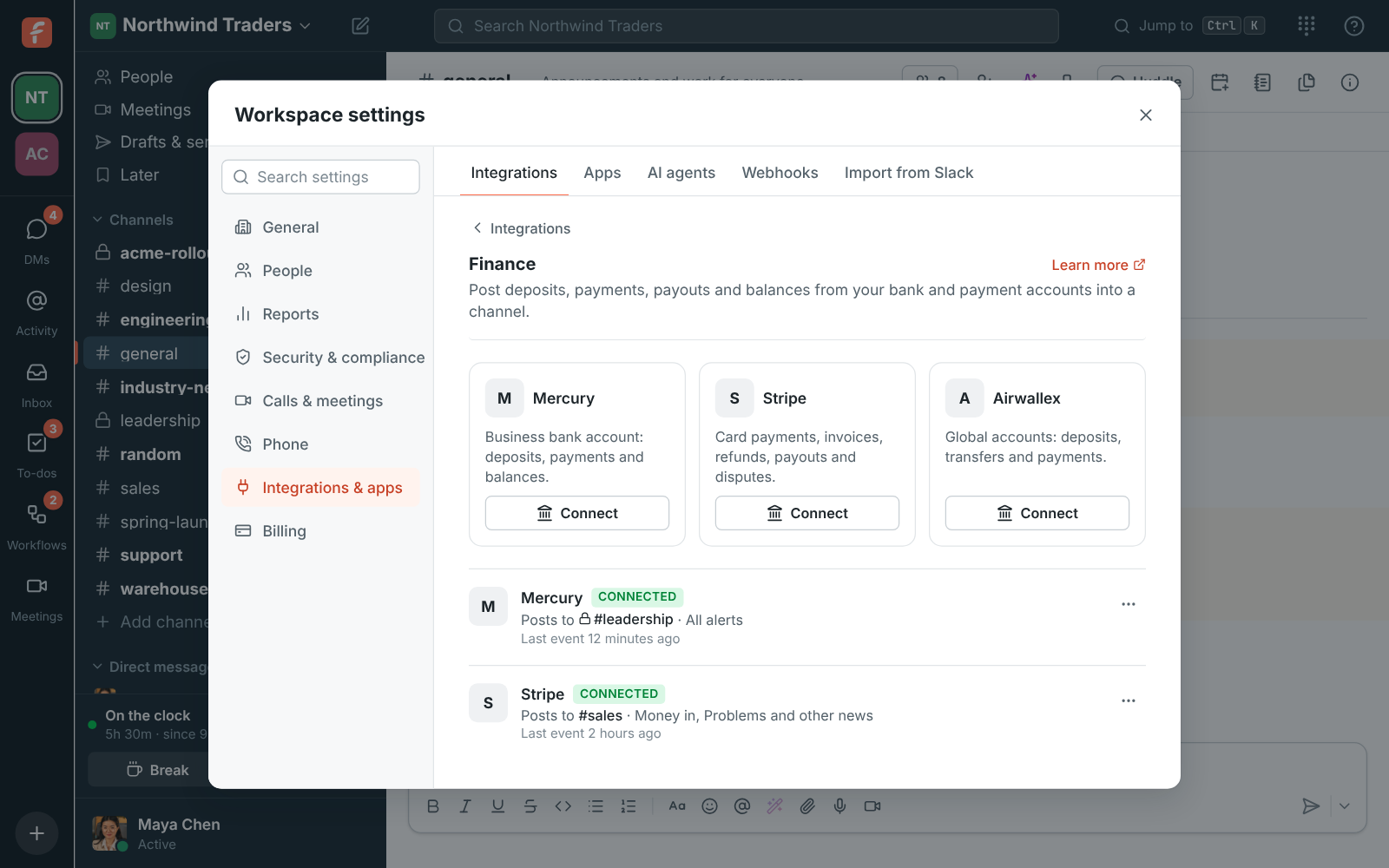
Workspace settings, Integrations, Finance: Stripe posting to #sales

Choose what to post

Money in covers payments received and paid invoices. Money out covers payouts and refunds. Balance changes post the new balance after money moves. Problems and other news covers failed payments, disputes, and new or canceled subscriptions. A smallest amount leaves out small payments in and out; balances always post. Money is private, so a private channel for your finance team works best.

  • Stripe amounts stay in each currency's own units, so ¥1,200 stays ¥1,200
  • Test-mode events are marked Mode: Test
  • Connect the same account twice to post to two channels

See it on your own team's data.

Start free with up to 10 people and try it today, or book a 20-minute demo with the people who make Freesbe.

Check it works, and stay safe

Send a test alert from the account's menu posts a sample card into the channel, and Last event says when Stripe last sent something. Every delivery is checked against Stripe's signature before anything is posted, old or replayed deliveries are refused, and the signing secret is kept encrypted. Freesbe can't move money or read anything beyond what Stripe sends.

Plans and pricing

Stripe is included in every plan, including Free.

  • FreeUp to 10 people
  • BusinessUp to 500 people
  • CorporateUp to 2,500 people
  • EnterpriseOver 2,500 people

Questions

Is this my Freesbe subscription?
No. Connecting Stripe here shows your own customers' payments, not your Freesbe billing.
Which plans include Stripe alerts?
Every plan, including Free. An owner or admin connects it in Workspace settings, Integrations, Finance.
I lost the endpoint URL. Where is it?
For your security it's only shown once. Delete the alert and connect again.
Can we post to two channels?
Yes. Each account posts to one channel; connect it twice to post to two.

Bring your tools, and your team.

Free for up to 10 people, no card and no time limit. Connect what you already use in an afternoon.