Freesbe

Trust

All plans

Know what you've used before it matters.

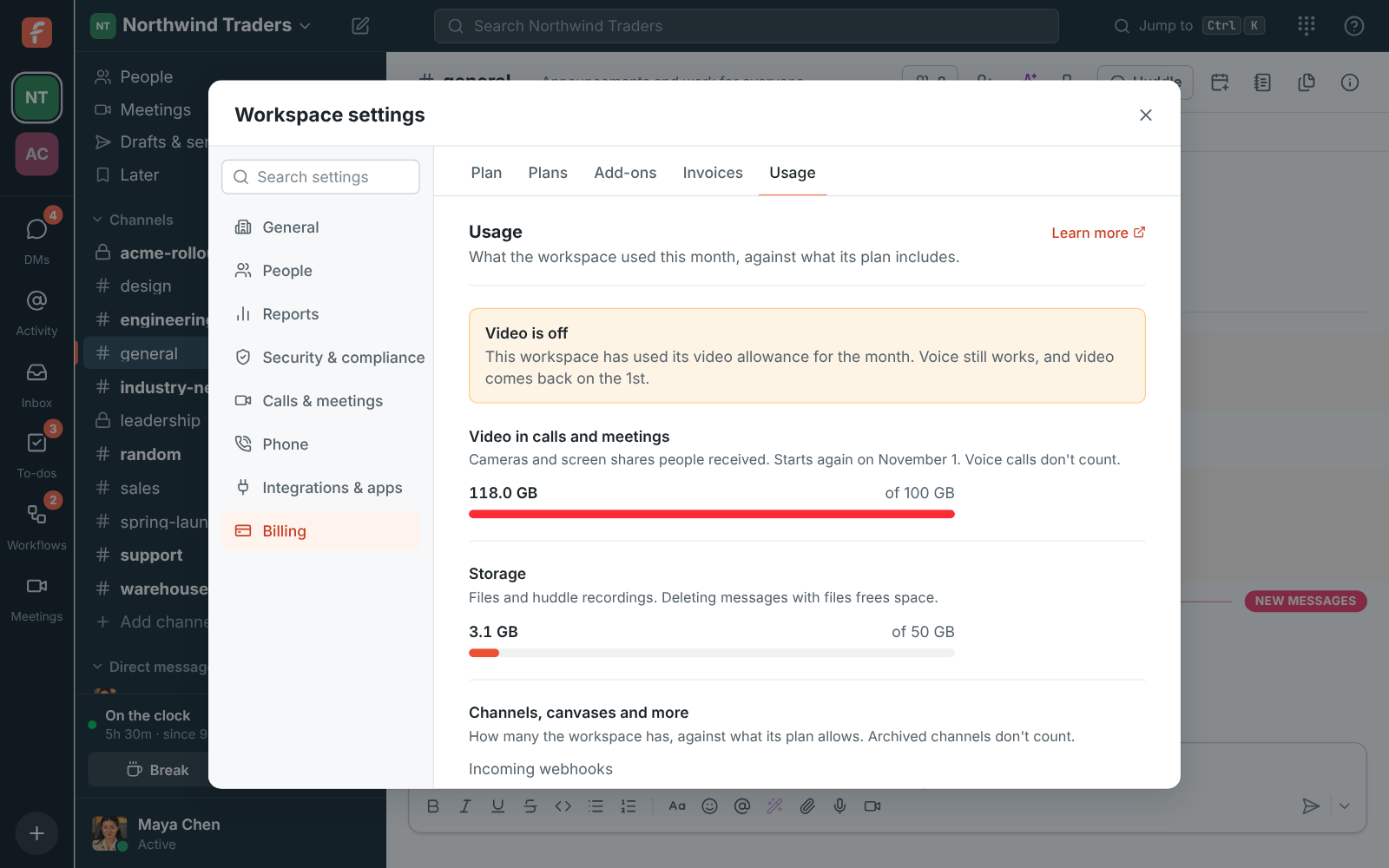
Under Billing, Usage, admins see how much video the workspace's calls used this month and how much storage its files and recordings take, each against its allowance, plus the counts of channels, canvases, workflows, apps and webhooks against the plan, with a warning once one passes 80%. Extra use isn't billed: a feature pauses until the 1st.

  • Never get a surprise bill: an allowance that runs out pauses the feature, it doesn't charge you.
  • See a warning when a count passes 80% of the plan, long before anyone hits the limit.
  • Agree a monthly spending limit on Enterprise and have Freesbe hold to it.
  • Read what the workspace spent today and this month on the Admin Center's Home.

For Admins and finance leads who want to know what a workspace uses and what it will cost.

Workspace settings, Usage: video against the monthly allowance, and storage

Video and storage, against the plan

Chat, voice calls and meetings without cameras have no limit. Two things do, because they cost the most to run: video in calls and meetings, counted as the cameras and screen shares people receive, and storage for files and recordings. Both show against their allowance under Billing, Usage. Video starts again on the 1st of each month; storage frees up when files or old recordings are deleted, or when the deletion rule removes recordings.
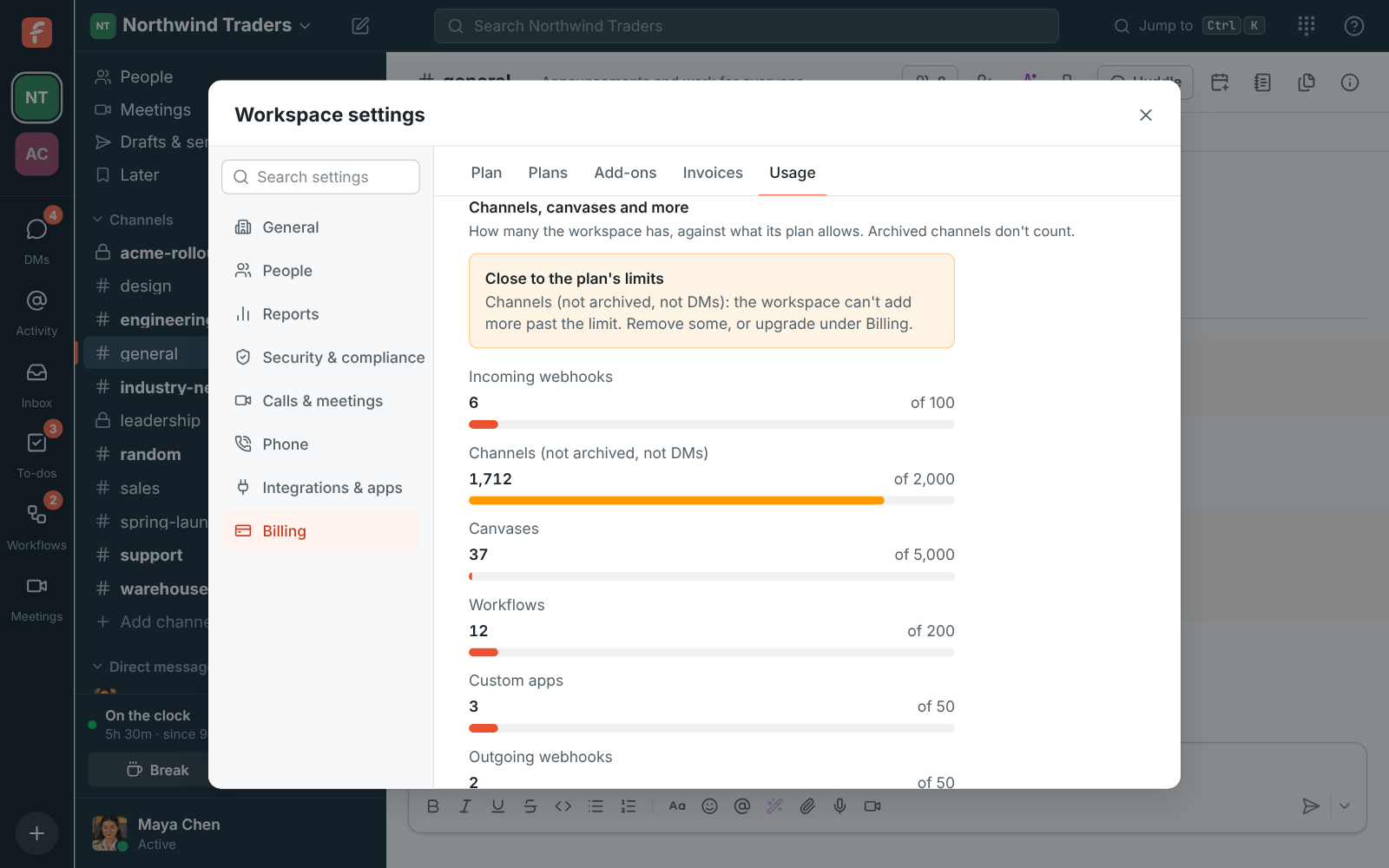
Usage in workspace settings: video used this month and storage taken

What happens at the limit

When the video allowance runs out, cameras and screen sharing turn off in every call, the buttons say why when you point at them, and everything else keeps working: messages, files, huddles without video and meetings. Video comes back on the 1st, on its own. When storage is full, new uploads and recordings stop with a message, and files already there keep working. Admins see a Video is off notice under Usage, with the date.

Usage showing the video allowance used and video off until the 1st

See it on your own team's data.

Start free with up to 10 people and try it today, or book a 20-minute demo with the people who make Freesbe.

Counts that stop runaway scripts, not teams

Each plan also has a fair-use limit on how many channels, canvases, workflows, apps, incoming and outgoing webhooks, guest links to recordings, scheduled meetings, Sign in with Freesbe tools, news feeds and AI agent connections a workspace can have, set far above what a team of that size uses. Usage shows each count against its limit, with a warning past 80%. At a limit, making one more stops with a message; nothing already there is removed. Freesbe can raise any of them for one workspace.

Usage: channels close to the plan's limit with a warning, and canvases, workflows, apps and webhooks well under theirs

Spending limits, and spend at a glance

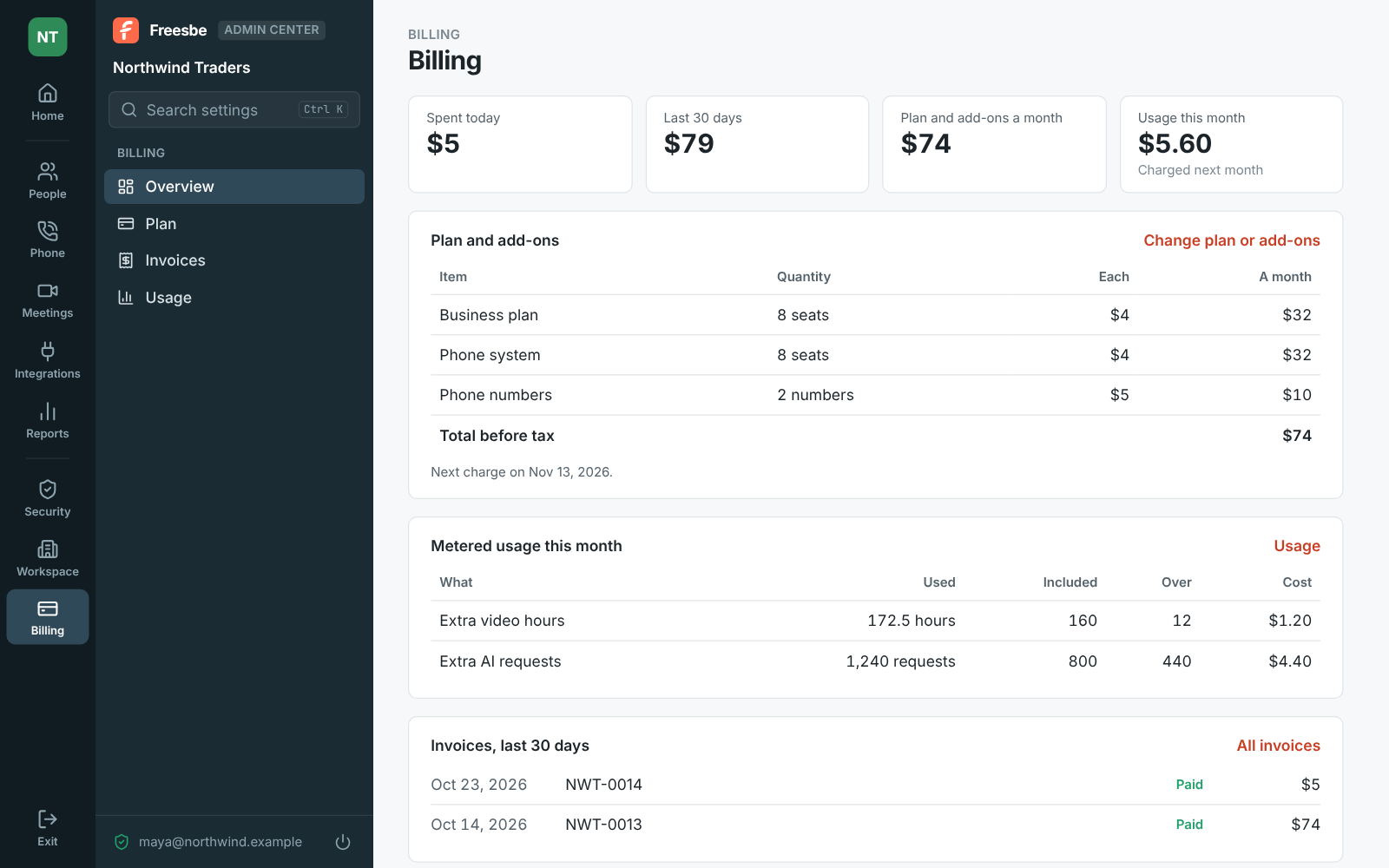
Freesbe can agree a monthly spending limit with a workspace, for example on Enterprise. If it's reached, video, screen sharing, recordings, transcripts and AI features stop until the 1st, and voice, messages and files keep working. The Admin Center's Home shows what the workspace spent today, in the last 30 days, and usage past the plan this month, and Billing, Overview breaks it down by plan, add-on and metered usage, with the next charge date.

Billing's overview in the Admin Center: spent today and in the last 30 days, the plan and add-ons, metered usage this month, and recent invoices

Plans and pricing

Usage and spending limits is included in every plan, including Free.

  • FreeUp to 10 people
  • BusinessUp to 500 people
  • CorporateUp to 2,500 people
  • EnterpriseOver 2,500 people

Questions

Which plan includes this?
Every plan, including Free, shows usage. Each plan's allowances and counts are on pricing limits, and Enterprise workspaces can have limits of their own.
Is extra use charged?
No. When the workspace reaches an allowance, that feature stops until the 1st of the next month and the rest of Freesbe keeps working. Your bill is only your plan and add-ons.
What counts as video?
The cameras and screen shares people receive. Voice doesn't count, and neither does your own camera preview.
Can we get more?
Yes. Freesbe can raise any count for one workspace, and Enterprise workspaces have custom limits; write to sales.

Try all of it free with up to 10 people.

No card, no time limit. Invite your team and see what sticks.