Freesbe

Connect

All plans

Industry news, where the team already talks about it.

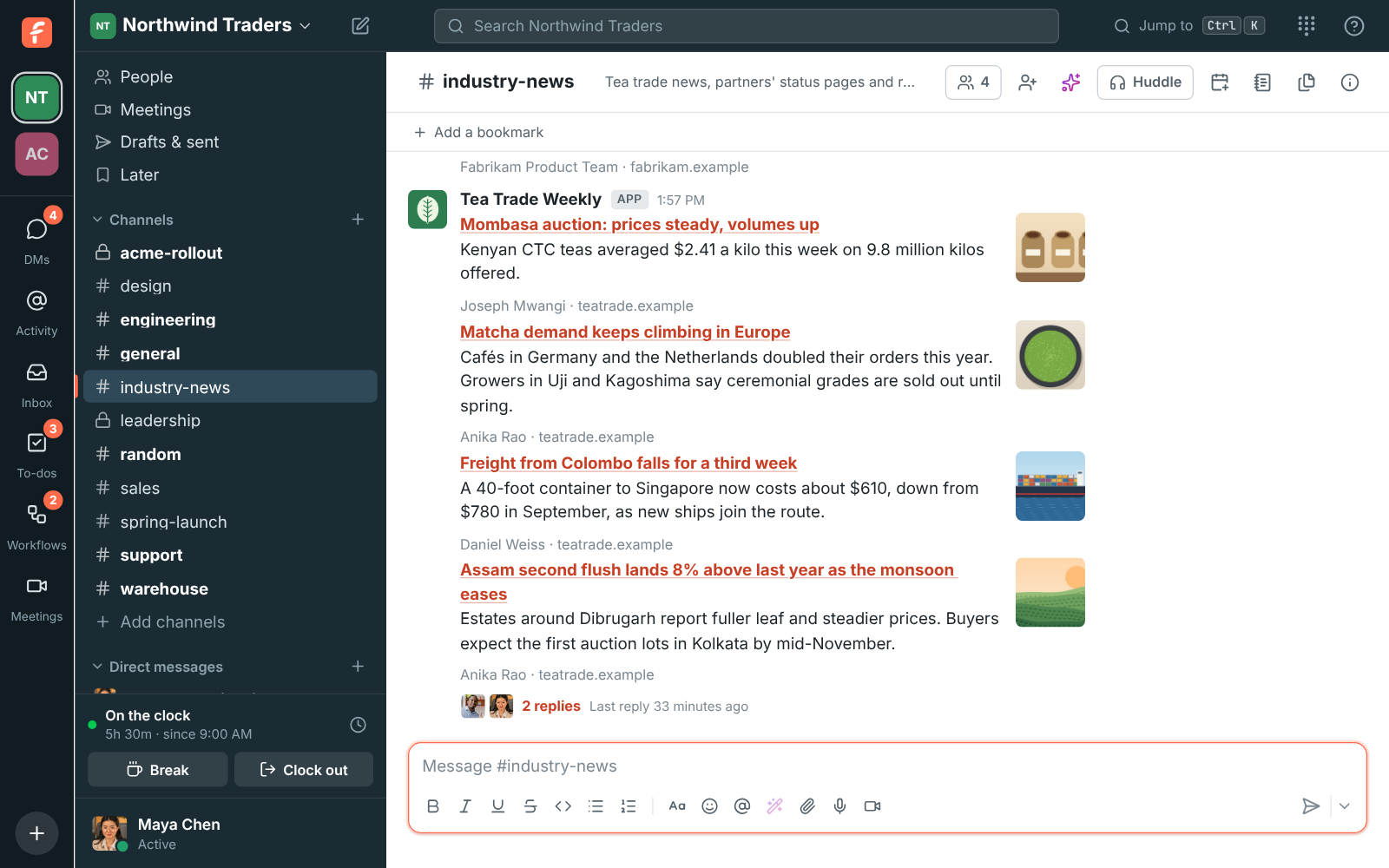
News feeds post new items from any site with a feed into a channel: a trade paper's articles, a partner's status page, a supplier's release notes or your own blog. Each card has the headline linked, a short summary, the picture and the author, under the feed's own name, and anyone replies in a thread.

  • Follow the sites that matter to your team without anyone checking them.
  • Paste a website's address and Freesbe finds its feed for you.
  • Post only the items about the words you care about.
  • Talk about a story in its thread, right under the card.

For Teams who follow trade news, a partner's status page or a supplier's release notes.

#industry-news with cards from Tea Trade Weekly, Contoso Logistics status and Fabrikam's release notes, and a thread under one story

Cards your team can scan and discuss

Each new item posts as a card with the headline as a link to the article, a short summary, the article's picture when it has one, and who wrote it. Cards post under the feed's own name and icon, so they're easy to tell from people, and anyone can reply in a thread to talk about the story. Freesbe reads RSS, Atom and JSON Feed.
#industry-news with feed cards and a thread under one story

Add a feed from the site's own address

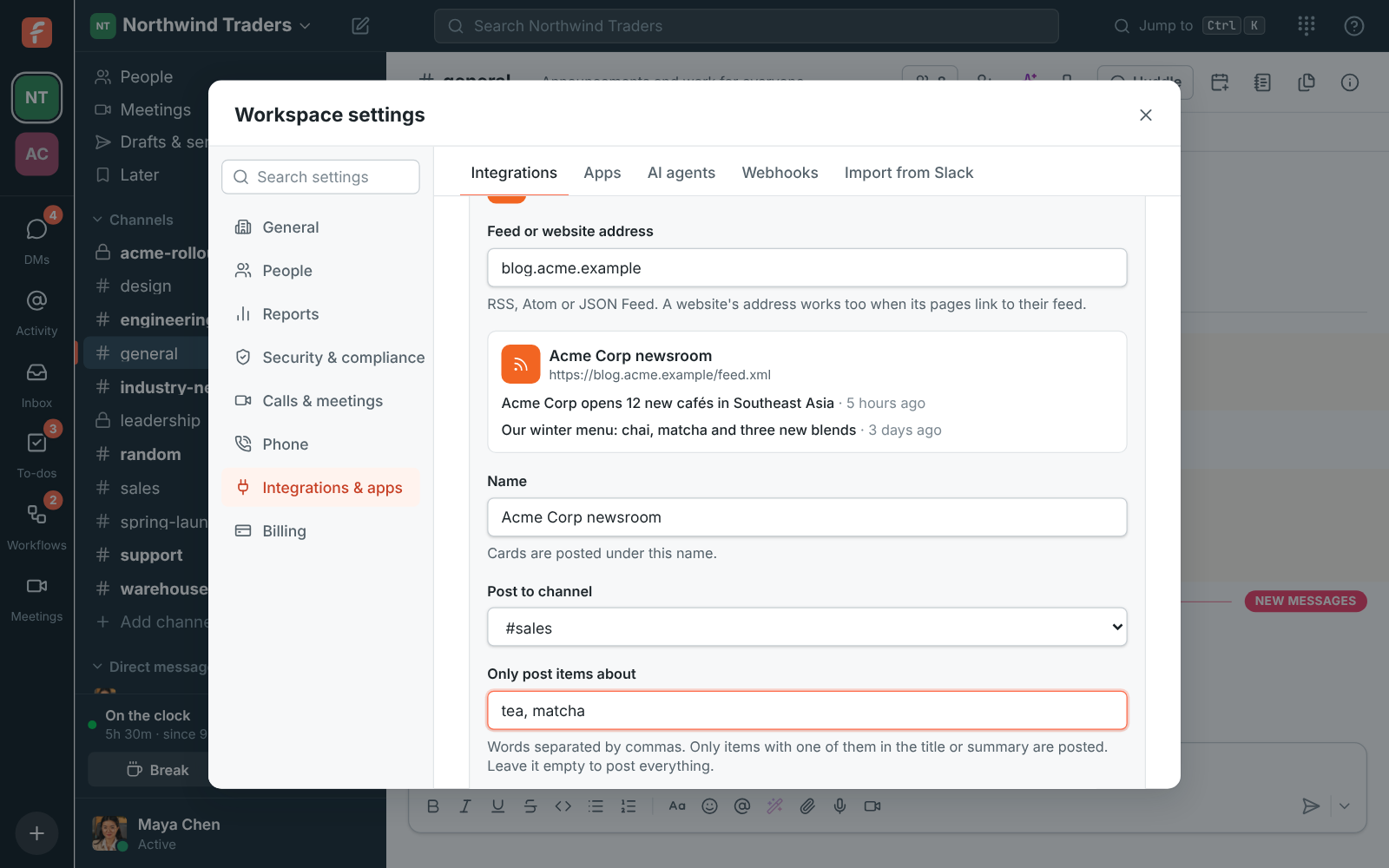
An owner or admin opens News feeds in workspace settings and pastes the feed's address, or just the website's, like blog.acme.example; Freesbe finds the feed the site links to and shows its title and newest items. Pick the channel, rename the feed if you like, and leave Post the newest item now on to see a card right away. Everything already in the feed counts as seen, so the channel isn't flooded with old articles.

Adding Acme Corp's newsroom: the feed found from the website's address, its newest items, #sales as the channel and the keywords tea and matcha

See it on your own team's data.

Start free with up to 10 people and try it today, or book a 20-minute demo with the people who make Freesbe.

Only the items about your words

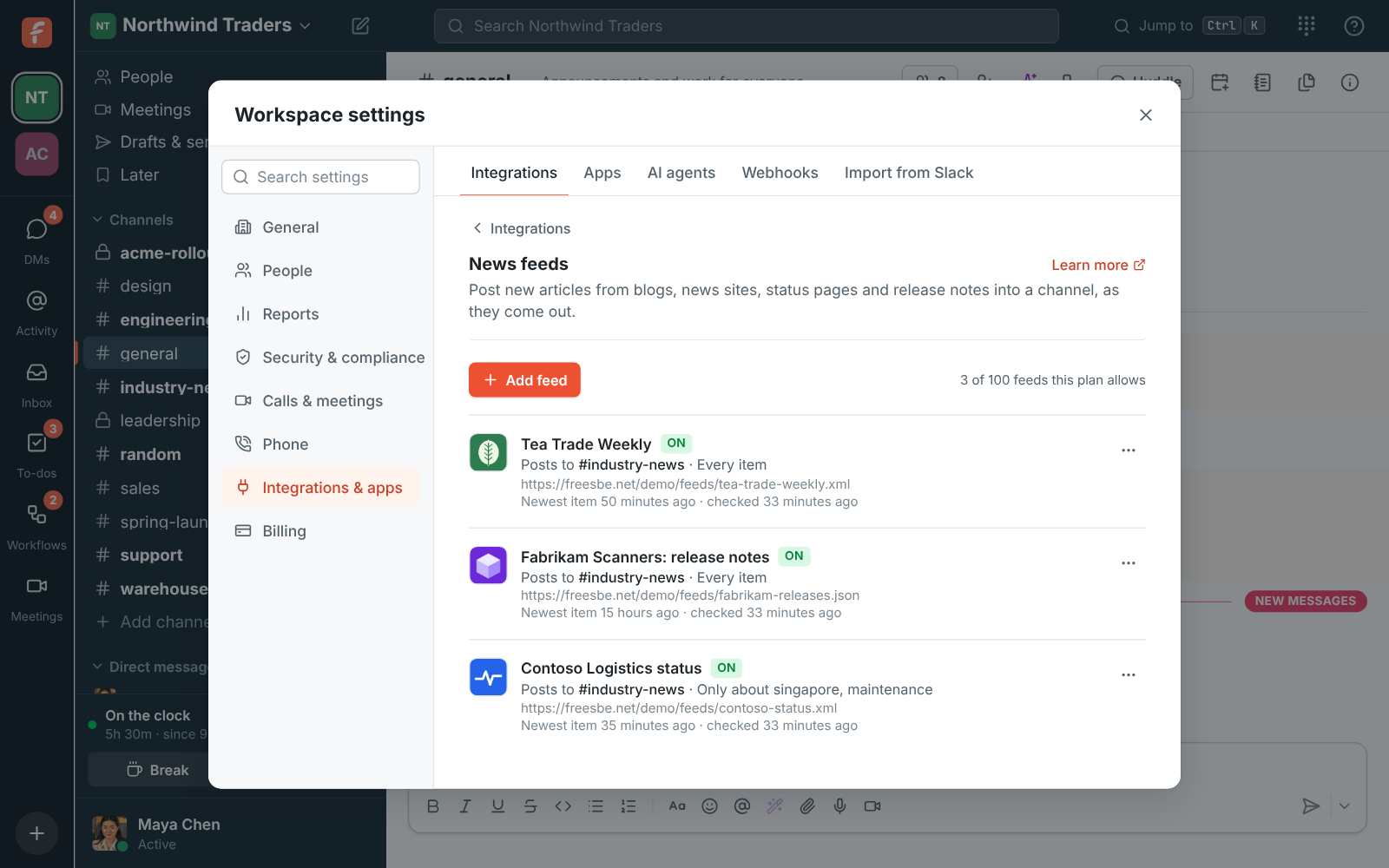
A busy feed can post only what matters to the channel. In Only post items about, list words separated by commas, like singapore, maintenance; an item posts when one of them is in its title or summary, whatever the capitals, and the rest are skipped. To post the same feed into two channels, add it twice, each with its own keywords.

Workspace settings, News feeds: three feeds, one filtered to Singapore and maintenance, all posting to #industry-news

Checked often, quiet when there's nothing new

Freesbe checks each feed every 15 minutes and asks the site for changes only. A quiet feed is checked less often, up to every two hours, and goes back to every 15 minutes as soon as something posts. At most five cards post from one check; when more came out at once, one more message says how many, with a link. When a site stops answering, the feed says so with the reason and is paused after three days, with one note in its channel.

  • Check now in the feed's menu to see a new item sooner
  • Turn a feed off and the items that came out meanwhile post when it's back on, up to five
News feeds in workspace settings, with each feed's channel and keywords

Plans and pricing

News feeds in a channel is included in every plan, including Free. Free includes a couple of feeds; the count grows with each paid plan, see pricing limits.

  • FreeUp to 10 people
  • BusinessUp to 500 people
  • CorporateUp to 2,500 people
  • EnterpriseOver 2,500 people

Questions

Which plan includes this?
Every plan, including Free. Free includes two feeds, and the count grows with Business, Corporate and Enterprise; settings show how many your workspace has used. See pricing limits.
Does the site see who's reading?
No. Freesbe fetches the feed itself, as FreesbeBot, so the site only sees Freesbe. Pictures on the cards load from the site, like any image on the web.
Can I add a feed that needs a password?
Not yet. Freesbe reads public feeds only.
Where do I find a site's feed?
Most blogs and news sites have one, often at /feed, /rss or /atom.xml. Pasting the site's own address usually works, because its pages link to it.

Try all of it free with up to 10 people.

No card, no time limit. Invite your team and see what sticks.