Freesbe

Phone

Business and up

Already on sip.io? Bring it into Freesbe.

Connect your company's sip.io account once, with its API address, account ID and key, and Freesbe creates a sip.io device for each person who sets up their phone. They get SIP credentials for a desk phone or any SIP app, calls and the dialpad work in the app, and when someone leaves, their device is turned off and its password scrambled.

  • Keep the phone system you have; Freesbe adds the chat, calls and dialpad around it.
  • One sip.io device per person, made the first time they set up their phone.
  • A desk phone or softphone that registers straight with sip.io, so calls work when Freesbe is closed.
  • Devices matched to the sip.io user with the same verified email, if you choose.
  • Leavers' devices turned off and their passwords scrambled, and Disconnect does it for all.

For Companies that already run their phones on sip.io and want them in the same app as the chat.

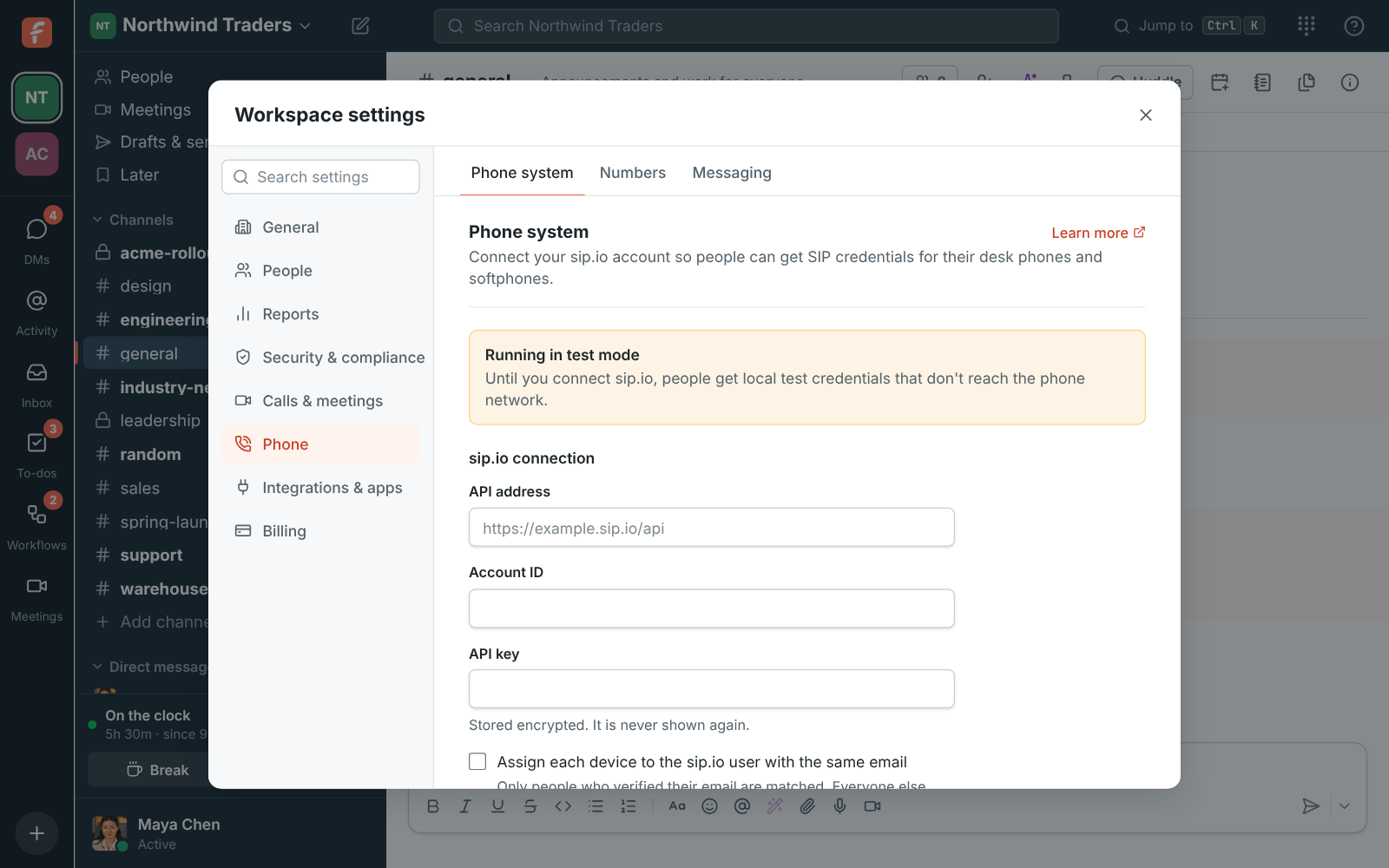
Workspace settings, Phone system: the sip.io connection

Connect once, from the Admin Center

An admin opens the Admin Center, Phone, Settings, enters the sip.io API address, the account ID and the API key, and clicks Connect sip.io. The key is stored encrypted and never shown again. Until then, the phone shows Test mode with placeholder credentials for trying the setup.
The sip.io connection in the Admin Center's phone settings

Each person sets up their phone

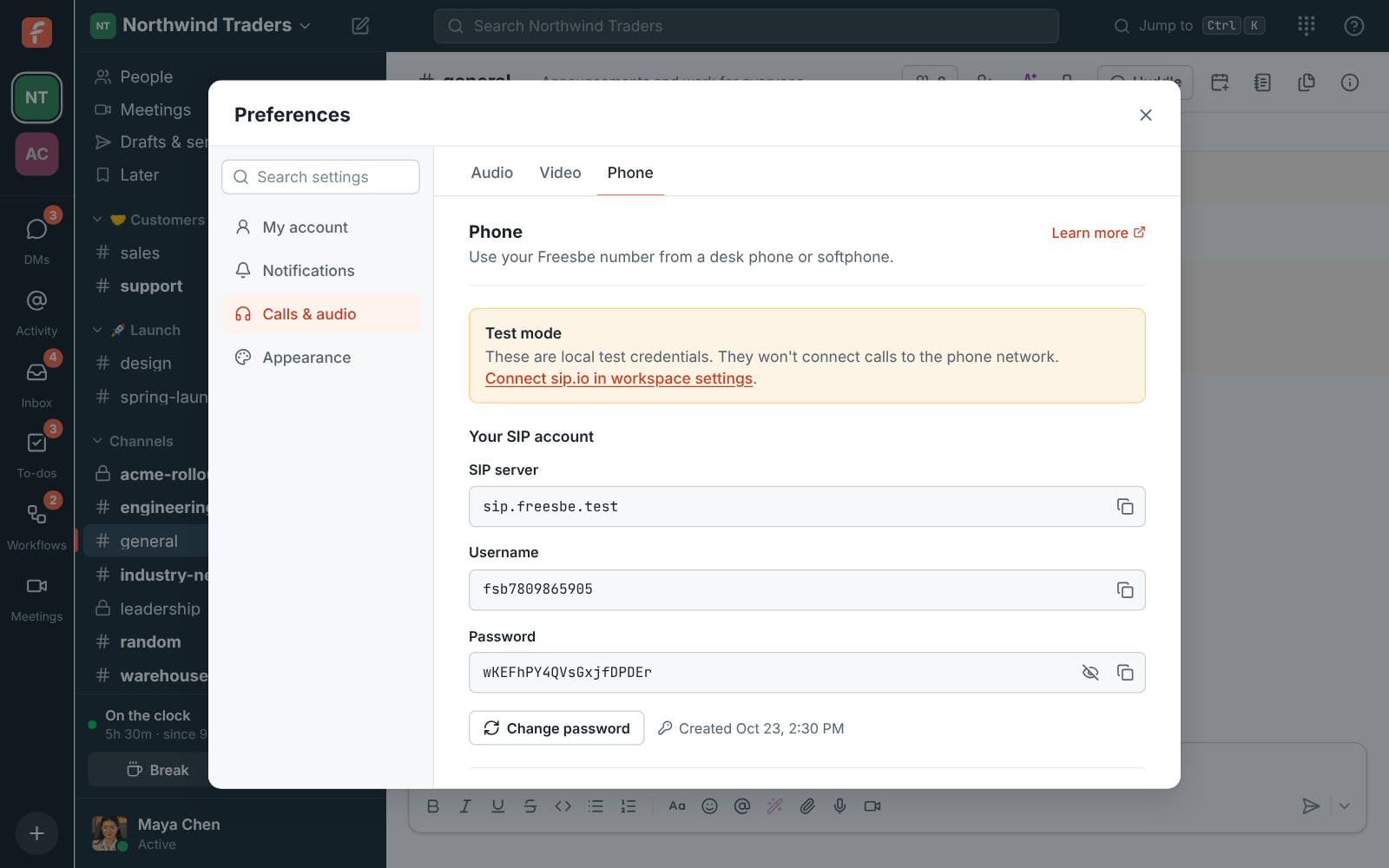
From then on, Freesbe creates one sip.io device for each person who sets up their phone, and they get SIP credentials from their preferences for a desk phone or any SIP app. Passwords are read from sip.io when someone asks to see theirs; Freesbe never stores them. Tick Assign each device to the sip.io user with the same email to link each device to the matching PBX user and extension, for addresses people have verified.

Preferences, Phone: the SIP credentials for a desk phone or softphone

See it on your own team's data.

Start free with up to 10 people and try it today, or book a 20-minute demo with the people who make Freesbe.

When people leave

When someone leaves the workspace, their device is turned off and its password scrambled. Disconnect turns off every device Freesbe made on sip.io and scrambles their passwords, so nobody keeps a working line by accident; connecting the same account again with a new key keeps everyone's devices. A workspace uses either Freesbe's own phone system or its sip.io account, not both.

Plans and pricing

sip.io is included in Business, Corporate and Enterprise.

  • BusinessUp to 500 people
  • CorporateUp to 2,500 people
  • EnterpriseOver 2,500 people

Questions

Do we need sip.io to make calls in Freesbe?
No. Freesbe sells a phone system of its own, with numbers, call flows, voicemail and texts. If you already have a sip.io account, connect it instead; a workspace uses one or the other.
Does Freesbe store our phone passwords?
No. Passwords are read from sip.io when someone asks to see theirs, and the API key is stored encrypted and never shown again.
Which plans include it?
The plans that include the phone line and dialpad. The pricing page has the current list.
What happens when someone leaves?
Their device is turned off on sip.io and its password scrambled, so the line stops working at once.

Bring your tools, and your team.

Free for up to 10 people, no card and no time limit. Connect what you already use in an afternoon.