Freesbe

Call and meet

Phone system add-on

Pass the call on, or bring everyone in.

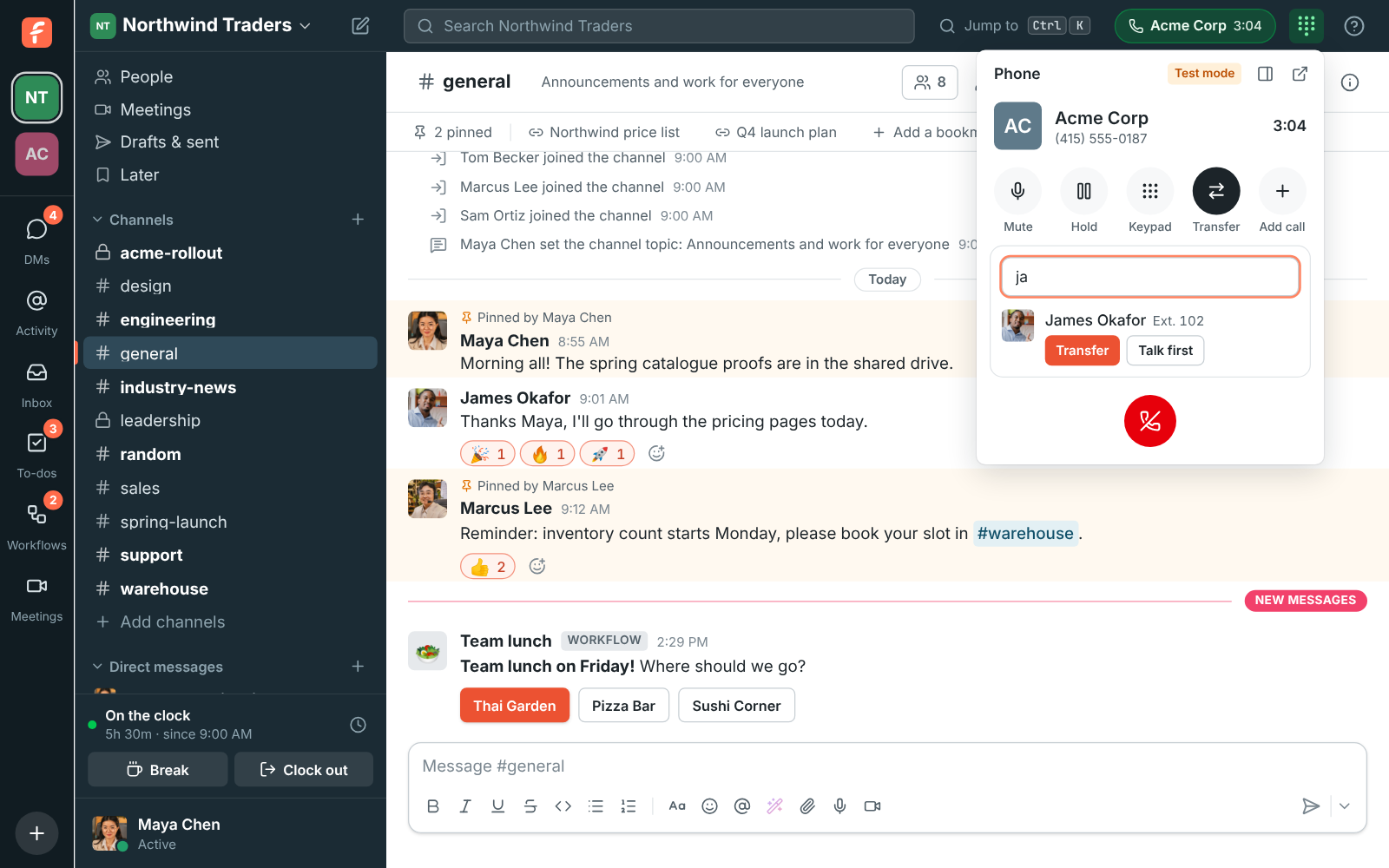
Click Transfer during a call and type a colleague's name, an extension, a queue or a number. Hand the call over when they answer, or talk to them first while the caller waits on hold, then complete it, merge everyone into a 3-way call, or go back. Follow-Me decides which devices ring, in what order, and where unanswered calls go.

  • Hand a customer to the right person by name, not by looking up an extension.
  • Brief your colleague before they take the call, while the caller hears music.
  • Get three people on one call when a question needs two answers.
  • Ring the device you're actually at first, and your phone a few seconds later.
  • Never leave a caller stranded: if nobody answers a transfer, they stay with you.

For Front desks, support teams and anyone who takes calls for other people.

Passing a call on: Transfer open during a call, with James Okafor found by name and Talk first and Transfer next to him

Transfer, or talk first

Each match in Transfer has two buttons. Transfer puts the caller on hold while their phone rings, and connects them when they answer; your side ends then, and if nobody answers the caller stays with you. Talk first lets you speak to your colleague while the caller waits on hold, to say who's calling and why. Then Complete hands the caller over, Merge brings them in for a 3-way call, or Go back returns you to the caller. A queue takes a transferred call straight away.
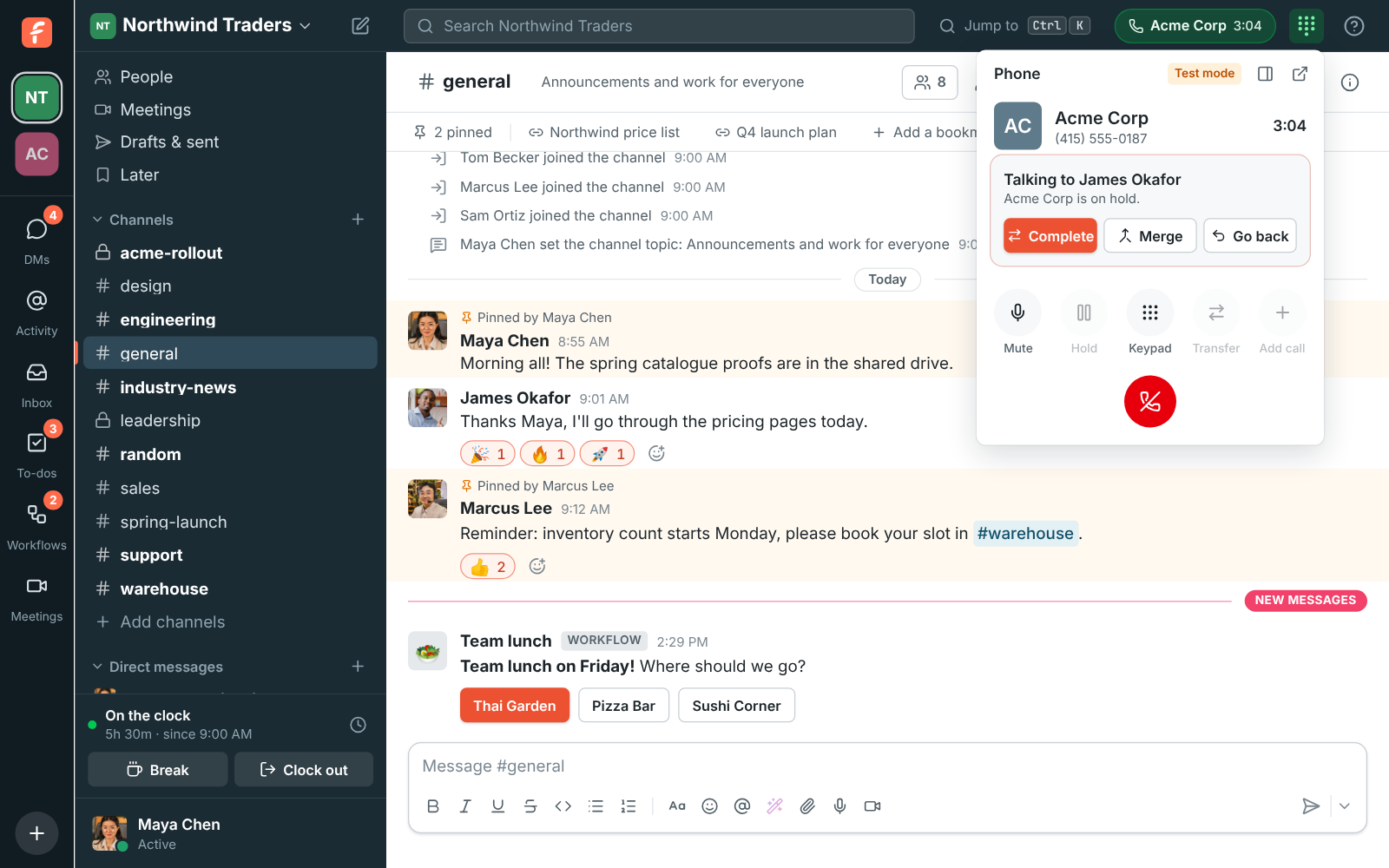
Talking to a colleague first: the customer is on hold, with Complete, Merge and Go back

Two calls at once, and 3-way calls

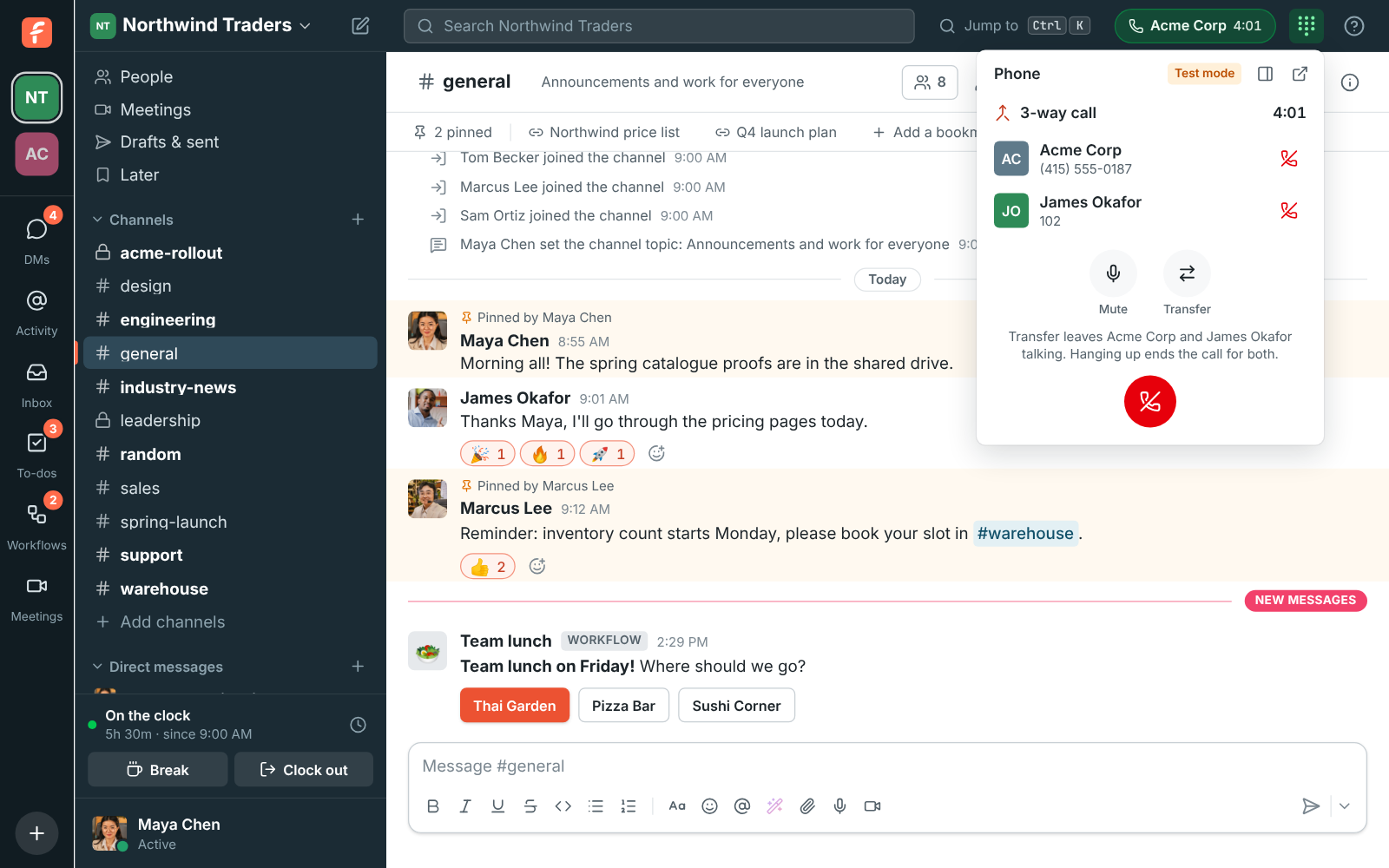
Add call puts the first call on hold and calls someone else: a colleague by name, an extension or a number. The call on hold waits at the top of the phone; click it to switch, as often as you like. With two calls up, Transfer connects the two people and you leave, and Merge makes a 3-way call where all three of you hear each other, with a hang up button for each person to drop just them.

A 3-way call with Acme Corp and James Okafor, each with their own hang up

See it on your own team's data.

Start free with up to 10 people and try it today, or book a 20-minute demo with the people who make Freesbe.

Follow-Me: how your calls ring

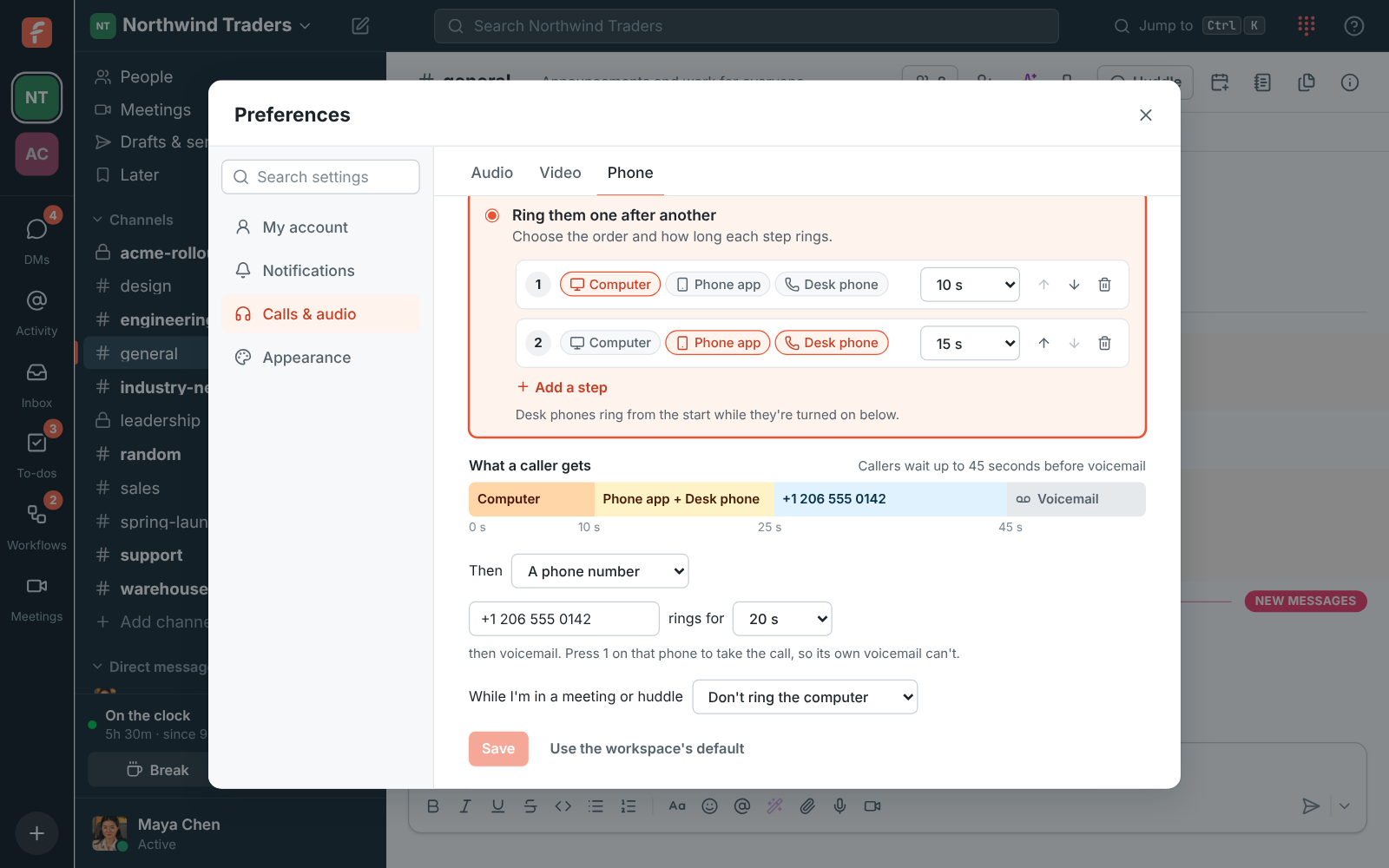
Your calls can ring the Freesbe app on your computer, the app on your phone and a desk phone. Ring where I'm working rings the device you're using now and brings the others in after 10 seconds unless you change it. Ring them one after another steps through the order you choose. If nobody answers, the call goes to your voicemail after 25 seconds, to a teammate, or to a phone number like your own mobile, which asks you to press 1 so its own voicemail can't take the call.

  • Or ring all your devices at once
  • Keep the computer quiet while you're in a meeting or huddle, so the call rings your phone
  • My devices lists what rings, with a switch to stop an old phone ringing
Preferences, Phone: Ring them one after another, with the computer for 10 seconds, then the phone app and desk phone for 15, then a mobile number for 20 before voicemail

Set it for someone, and lock it

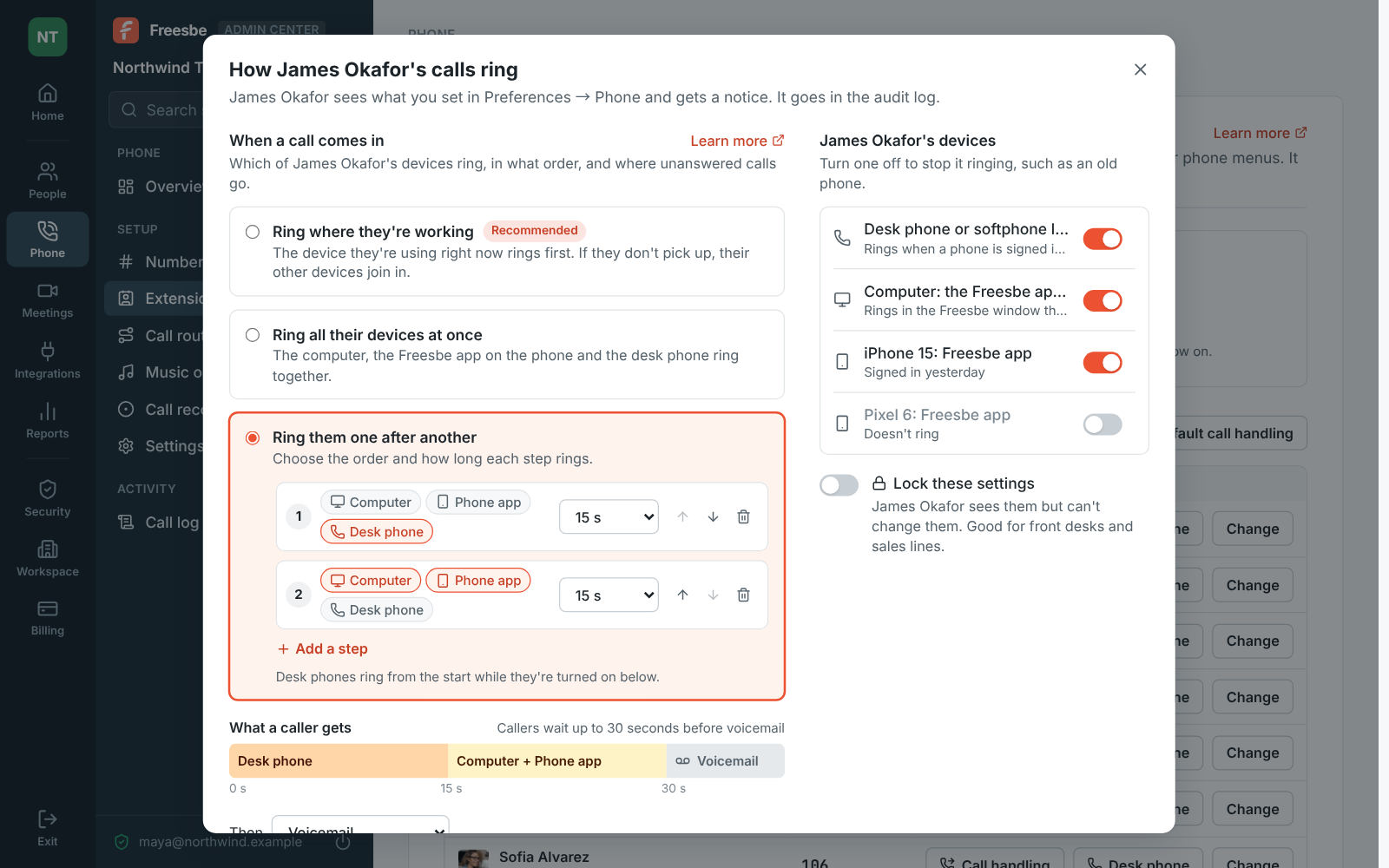
Admins and Phone admins set Follow-Me for someone in the Admin Center, like a receptionist whose calls should reach the desk phone first, with the same choices and a switch for each device. Lock these settings lets them see it but not change it; they get a notice, and the audit log records the change. Default call handling sets what everyone gets until they choose their own.

Admin Center, Extensions: how James Okafor's calls ring, his desk phone for 15 seconds then his computer and iPhone, with an old Pixel turned off

When a call doesn't go through

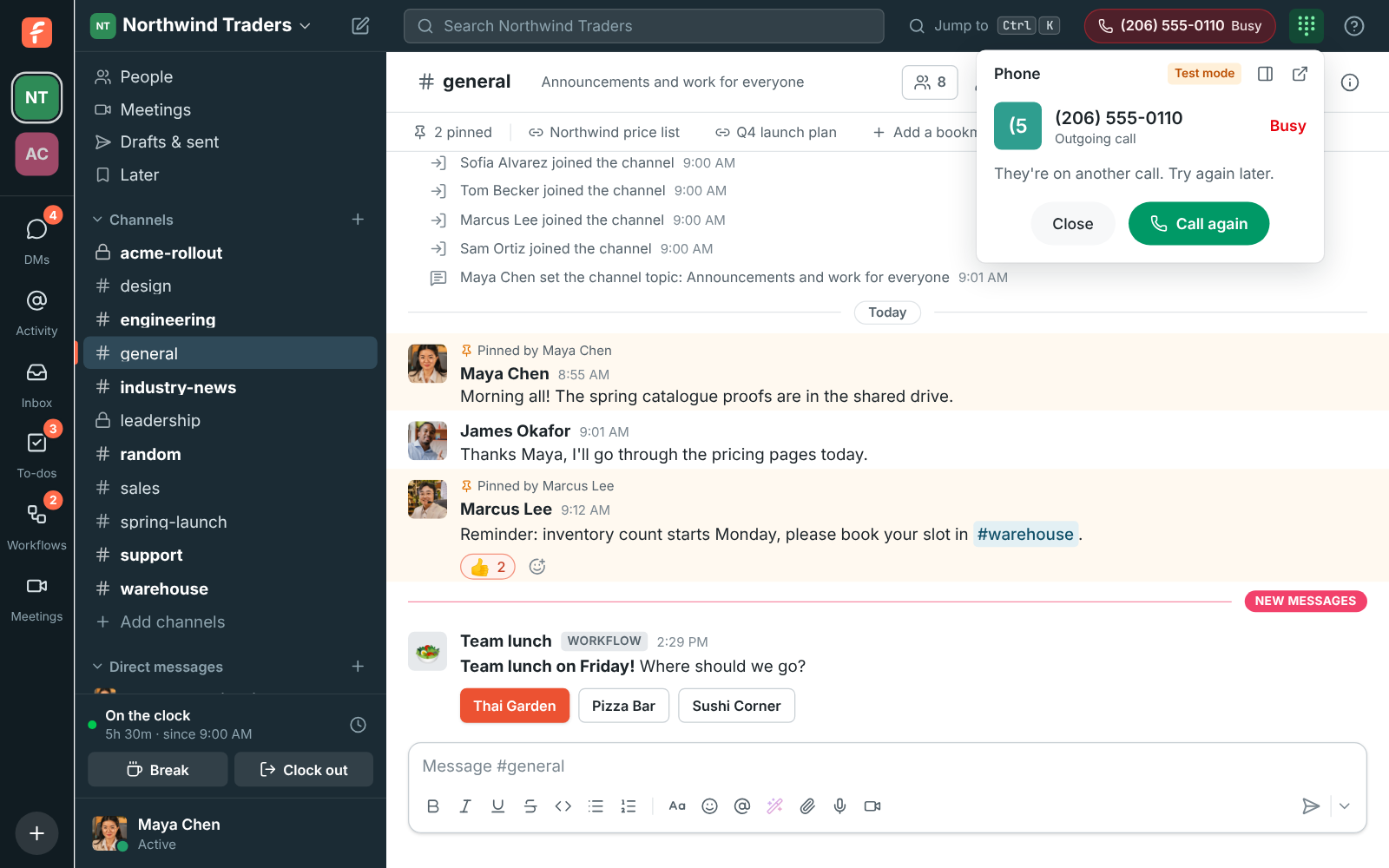
If a call can't be put through, the phone says why and plays a tone: Busy, No answer, Declined, Number not found, or Call failed with the phone service's reason. Press Call again to try the same number. A call that comes in while you're already on one isn't put through, so it goes on as if you didn't answer.

A call that didn't go through: the phone says Busy, they're on another call, with Close and Call again

Plans and pricing

Transfers, 3-way calls and call handling comes with the Phone system add-on, on any paid plan. It costs $8 per person a month, billed yearly ($10 month to month). The add-on isn't on sale yet; talk to us to be first.

  • BusinessUp to 500 people
  • CorporateUp to 2,500 people
  • EnterpriseOver 2,500 people
  • Phone system add-on$8 per person a month, billed yearly ($10 month to month)

Questions

Which plan includes this?
Transfers, 3-way calls and Follow-Me are part of the Phone system add-on, on top of any paid plan.
Can I transfer a call to a queue or an outside number?
Yes. Transfer finds colleagues by name, extensions, call queues and phone numbers. A queue takes the call straight away; its next free agent answers.
Can I transfer from my phone?
Yes. On the phone app, Transfer passes the call to a colleague, a contact or a number you type. Their phone rings and you're off the call.
Which window rings?
Calls ring in one Freesbe window on your computers at a time, the last one you opened; the phone elsewhere says so with Ring here to bring them back. Your desk phone or softphone keeps ringing as well.

Try all of it free with up to 10 people.

No card, no time limit. Invite your team and see what sticks.